Your business can earn the badge or pay for it
Instagram gives a business the verified badge through two routes: a free notability review, or a paid Meta Verified for business subscription.
The requirements page in the Instagram Help Center names both routes, read on November 25, 2026. Some badges sit on accounts that Meta judged notable. Others sit on accounts that pay for Meta Verified, which also bundles enhanced support and impersonation protection. A visitor sees the same blue check. The checks behind it differ.
A business that already holds a badge from the older notability rules can still subscribe, according to that page. Holding one kind of badge never rules out the other, and a brand may try one route and then the second.
Obscura is neither part of Instagram nor of Meta, but an independent content reporting and takedown service. It does not grant, sell, or arrange badges. Its team prepares reports and evidence files when a fake account copies a business. Meta alone decides who gets verified, on either route.
Instagram business verification badge requirements, route by route
The free badge tests whether a business is well known; the paid badge tests whether the business is real and eligible to subscribe.
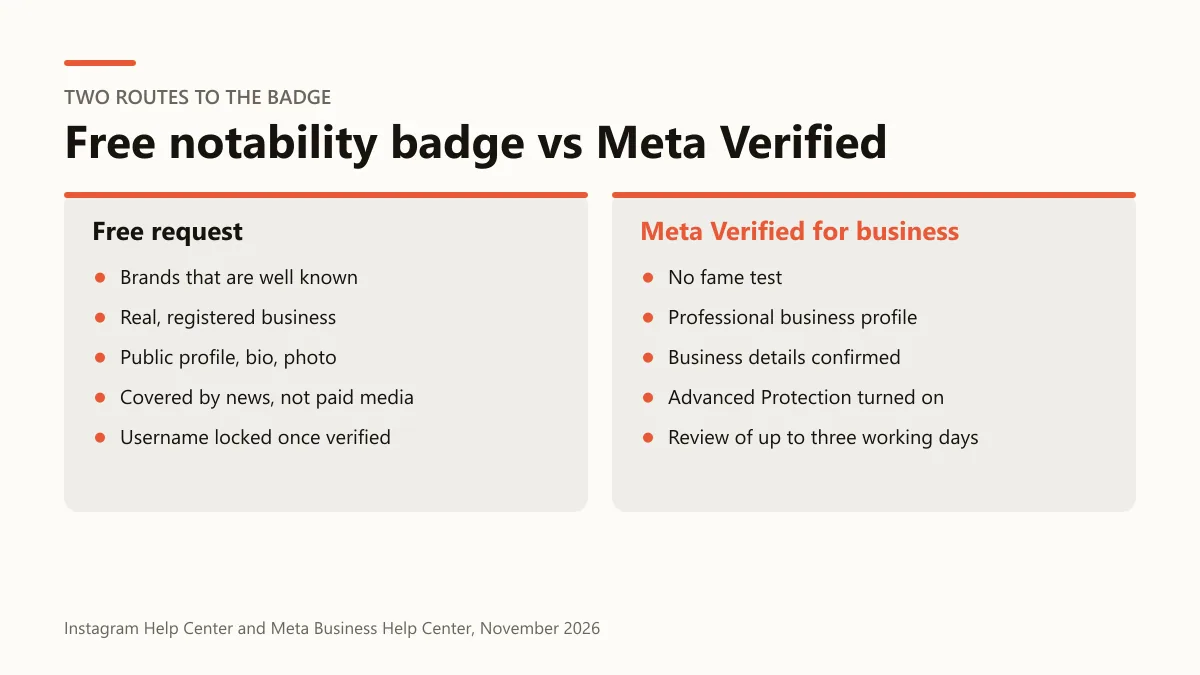
| Check | Notability badge (free request) | Meta Verified for business (paid) |
|---|---|---|
| Who it is for | Public figures, celebrities, and brands | Businesses with an eligible asset |
| Identity | A real person, registered business, or entity | Business details confirmed by a verification method you choose |
| Profile | Public, with a bio, a profile photo, and recent activity | An Instagram professional business profile |
| Fame | Covered by multiple news sources, paid media excluded | Not required |
| Uniqueness | One verified account per business, language accounts excepted | Up to two assets in one business portfolio |
| Security | Two-factor authentication suggested after approval | Advanced Protection required on the business portfolio |
| Outcome | A request, reviewed with no promise of approval | A review that can take up to three working days |
The left column comes from Instagram's notability criteria, and the right column from Meta's business subscription overview. Both were read in November 2026.
A badge helps customers tell the real account from the fake, and Meta lists impersonation protection among the subscription's benefits. Neither one is a removal request for a clone that is already live. That takes a separate filing, and the site's guide to an Instagram business impersonation report covers the in-app business option, the trademark form, and the evidence to save before the fake account renames itself.
Requesting the free badge from the Professional dashboard
A business that passes all four notability tests requests the badge inside the Instagram app, from the settings of its Professional dashboard.
The steps on Instagram's professional account page run like this, as of November 2026:
- Go to your profile and tap Menu in the top right.
- Select Professional dashboard, then tap Settings at the top.
- Scroll down and tap Request verification.
- Fill out the form and tap Submit.
The request works only in the app. The same page warns that sending it does not guarantee a badge. Paid or sponsored articles do not count toward the news test, and a general interest account, such as a meme page, is not verified at all.
Pick the final username first. Once an account is verified for notability, its username may not change, per the requirements page. That matters for a brand planning a rename, or for one still trying to get a taken handle back before it applies.
Meta Verified for business Instagram profiles: what the sign-up checks
Meta Verified for business asks for an eligible business asset, a recurring payment, and proof that you are connected to the business you name.
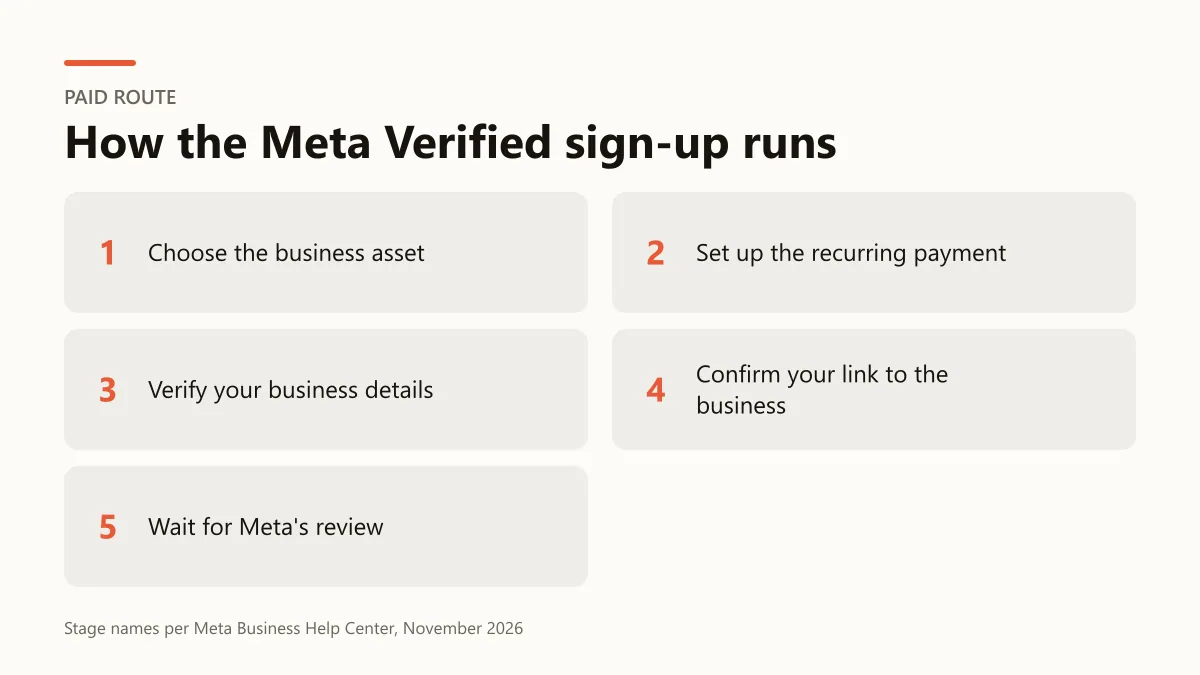
Meta's overview of the business subscription lists three eligible assets. They are an Instagram professional business profile, a Facebook business Page, and a WhatsApp business profile. Creators are sent to a separate help center. Sign-up runs in three stages:
- Choose your business. Pick the asset or assets and set up the recurring payment. Two assets from one business portfolio is the usual limit, or three in the Facebook mobile app or Meta Business Suite on a computer.
- Verify your business details. Choose a verification method, give the business information, and confirm your connection to it. Some accounts are verified from their activity, such as name tenure and profile completeness.
- Get reviewed. Meta sends a status notification, and the page says this review can take up to three working days.
Before you start, have one of the verification methods on Meta's list of business verification methods ready, as read on November 25, 2026:
- Business details that match a public business record, such as the registered name and address.
- An official document to upload when no public record matches.
- A valid government-issued photo ID, front and back.
- Access to the business bank account, to log in and confirm the details.
- A way to confirm your connection: a code by email, text, or phone call, an ID upload, or domain verification through your web host or DNS provider.
Not every method is offered in every region. A profile name that differs from the public record is the mismatch to fix before you apply, since the details you give must match that record.
Two conditions are easy to miss. Per Meta's business subscription overview, Advanced Protection has to be on for the business portfolio, and it cannot be switched off while the subscription is active. Bundled assets may also need similar names and pictures.
The plans are Standard, Plus, Premium, and Max, per the plan list on that overview. Every plan includes the badge. Employee impersonation protection appears only in Premium (two employees) and Max (five employees). Plans and benefits vary by region, so the sign-up screen is the final word.
Which route fits your business
A business with real press coverage can try the free request first; a business without it should look at the subscription instead.
Neither Instagram help page read for this guide sets a follower minimum, as of November 2026. The notability test asks whether people search for the brand and whether news outlets cover it. A shop with a loyal following and no press does not meet the "Notable" test as Instagram words it.
For example, take a hypothetical ceramics studio at kilnroom.example.com. Its profile is public, the bio is full, and it posts every week. No news outlet has written about it. The free request has little to stand on, so the studio's realistic route is Meta Verified on its business profile, after it turns on Advanced Protection.
If that studio runs a creator account instead, the business plan does not list it. The site's note on how the account type changes the route explains what separates the two.
A business that fits neither route yet can still make its real account easy to recognize: a clear bio, behind-the-scenes Stories, and tags from real customers. Obscura cannot predict a review on either route.
What can cost the badge, and what Obscura declines
A badge obtained with false or misleading information is removed, and Meta may also disable the account or block the business from verification.
That rule sits on both the Instagram requirements page and Meta's business overview. Claiming a business you are not authorized to represent is named outright on the business side. Meta also says an active subscription can be revoked over integrity concerns and fraud risk.
Some requests Obscura turns down, each for a reason:
- Buying a badge from a third party, because only Meta grants badges, through its own review.
- Paid articles placed to pass the news test, because paid or sponsored media does not count.
- Sharing a password or a 2FA code. No verification step needs an outside service to log in.
- Mass reports against a rival's verified profile, because Instagram says report volume does not decide removal.
Next step: decide which route fits, then set the final username before you apply.