Who can report a business impersonator, and who decides
Any person who runs or represents the business can file the report, and Instagram's own reviewers decide whether the fake account stays up.
The in-app impersonation report covers four targets (Instagram Help Center on reporting impersonation, read November 2026). The page names the reporter, an account the reporter follows, a public figure or celebrity, and a fourth choice labelled "A business or organization". That fourth choice is the one for a clone of a shop, a studio, or a brand. A manager signed in to the real business profile can use it. So can the owner from a personal profile.
A similar name on its own is not the problem. Instagram hands out usernames on a first-come, first-served basis, so a rival can hold a handle close to yours. The violation is the pretending: your logo as the profile picture, your bio copied word for word, posts that tell your customers where to send money.
Obscura is not affiliated with Instagram or Meta but an independent content reporting and takedown service. On a business clone, its team first sorts the case by the rule broken and the form that fits, then prepares the evidence file and the wording of the report. Instagram makes the call on removal. No outside service can see inside that review or shorten it.
Match your situation to the right Instagram form
The right form depends on what the fake account took from you: the business name, a registered trademark, your products, or your customers' money.
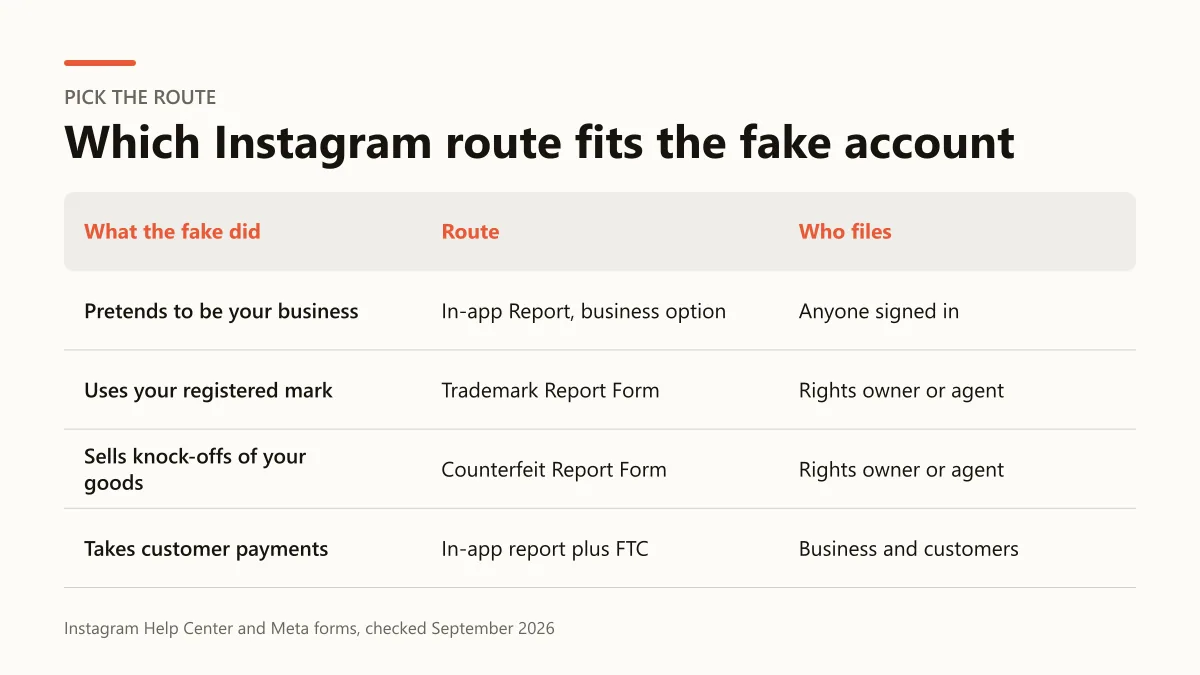
| Your situation | Route | Who may file |
|---|---|---|
| The account poses as your business | Profile menu, Report, impersonation reason, then "A business or organization" | Anyone signed in to Instagram |
| Your registered mark sits in the fake's name, username, bio, or profile picture | Meta's trademark form | The mark's owner, or an agent acting for the owner |
| The fake sells knock-offs of your products | Counterfeit Report Form, option "An entire account" | The rights owner, or someone they authorize |
| The fake takes payments from your customers | In-app report, plus ReportFraud.ftc.gov | The business, and each customer who paid |
| Nobody at the business uses Instagram | The Meta contact form the Help Center links for people without an account, or a staff member signs up and reports in-app | The business, or a staff member |
Among the reasons on Meta's trademark form is a mark shown in a profile's photo, display name, handle, or bio. The Counterfeit Report Form lets a rights owner report a whole account rather than single posts. Both were checked in September 2026.
If nobody at the business has an Instagram account, the same impersonation help page sends you to a Meta contact form instead of the app. It also handles reports filed for a person you represent, for example a child.
Some owners get a faster-sounding offer once a clone appears: a seller who promises to aim a report bot at the fake profile. Instagram's Help Center answers that directly: report count does not decide whether something comes down. A code review of one public Instagram mass reporter tool shows a second problem, since its script stops after three logins. The forms in the table are the routes that put your evidence in front of a reviewer.
Filing an Instagram business impersonation report from the app
An Instagram business impersonation report starts on the fake profile, never on your own account, and takes a few minutes once the evidence is saved.
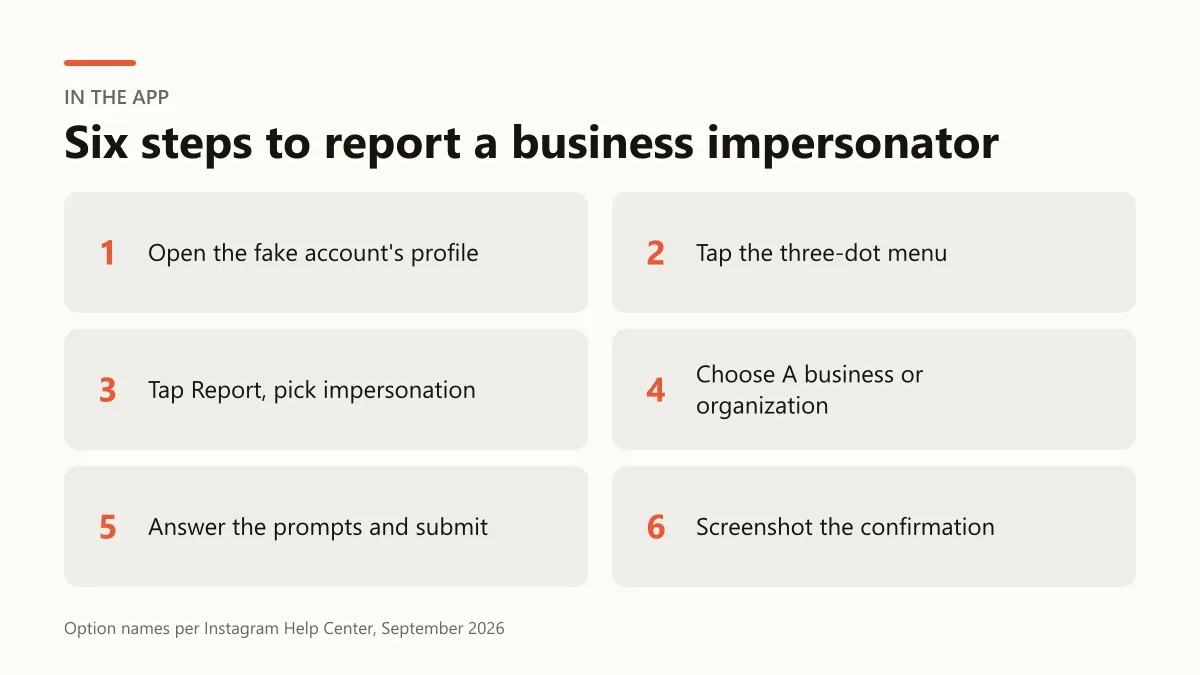
- Open the fake account's profile in the Instagram app.
- Tap the three-dot Options menu next to the username.
- Tap Report, then Report Account.
- Pick the impersonation reason from the list of report reasons.
- Choose A business or organization, answer the remaining prompts and submit.
- Take a screenshot of the confirmation screen and note the date.
The option names above match Instagram's help page as of November 2026. App menus move around, so read each screen before you tap.
Report the profile, not one post. A report on a single post asks a reviewer about that post. The impersonation reason asks about the account as a whole, which is the question you want answered.
For a clone that also copied your photos, a copyright notice is a separate filing with separate rules. The site's comparison of the impersonation report and the copyright form walks through which one fits.
Save this evidence before the clone renames itself
Four items carry a business impersonation case: the fake's URL, dated screenshots, proof that your business came first, and the trademark record if you have one.
- The profile URL and the exact username, written out in full. A clone can rename itself within seconds.
- Full-screen captures of the fake profile, its bio, and each post carrying your logo, with the date showing.
- Messages the fake sent to your customers, saved with each customer's permission.
- A link to your real profile and your website, so a reviewer can compare the two side by side.
- A dated folder for all of it, with a plain title such as "Report Instagram account impersonating a business", so anyone on the team can find it.
- Proof your business came first: registration date, website launch date, or the real profile's first post.
- The mark's registration number, plus its registry entry or certificate, if the trademark route is on the table.
Obscura assembles this file before any report goes in, because a clone that renames itself takes the old evidence with it.
Requests can fail for plain reasons. The first is the wrong form. Meta's counterfeit form refuses anyone who is neither the rights owner nor authorized to act for that owner. The trademark form accepts one registered mark per report, with room for up to 30 links to the content.
The second is the wrong email address. Both IP forms carry a disclosure warning. The operator of the clone receives three things from Meta: who owns the right, the email of whoever filed, and what the complaint says. Use a business address you do not mind a stranger seeing.
The third is a stated reason the screenshots cannot back up. If the fake only shares a similar name, say so plainly. Overstating the case gives a reviewer a reason to stop reading.
When the fake account takes your customers' money
A clone that collects payments is fraud as well as a broken rule, so both the business and every customer who paid should report it outside Instagram too.
In the U.S., a Federal Trade Commission rule covers this directly (16 CFR 461.3, Cornell LII, read November 2026). Under it, a person who would "materially and falsely pose as" a business commits an unfair or deceptive practice. Customers who lost money can file at ReportFraud.ftc.gov and call their card issuer the same day. The business can file there as well, describing the clone and the handle.
For example, take a hypothetical bakery called Larkspur Bakes at larkspurbakes.example.com. A profile named larkspurbakes.shop copies its logo and posts a giveaway that asks winners for card details. The owner reports the profile in-app as a business, saves the giveaway post, and pins a story naming the real handle. Two customers who entered then file their own fraud reports and call their banks.
Instagram will not tell you who runs the fake. Private parties cannot obtain account content under U.S. federal law, according to the Help Center entry on impersonation accounts. Basic subscriber details need proper legal process, served on the right Meta entity, with the username, profile URL, and relevant date. That is a job for a lawyer, not a report button. A separate note on the wait after an Instagram report covers the reporter's side.
What happens after the report, and where control ends
After the report, the decision belongs to Instagram, and the business keeps three jobs: watching the clone, adding new evidence, and switching routes if the first one fails.
Meta's intellectual property transparency page puts the usual turnaround for a valid IP report at one day or under, and such a report can reach a whole profile. That timing belongs to IP reports alone. The page gives no timing for the in-app impersonation button.
Prevention has a paid option. Instagram's impersonation reporting page mentions an impersonation protection benefit for Meta Verified subscribers, as of November 2026. It watches for copies. It does not remove anything by itself.
When the fake account using your business name stays up
A clone that survives the first report can still meet a stronger route. Check whether a stronger route now fits: a registered mark opens the trademark form, and sold knock-offs open the counterfeit form. Report again only when the clone does something new, and attach the new evidence. Meanwhile, warn customers from the real profile with a pinned line such as "There is a fake account using my business name Instagram has not removed yet. This profile is the only real one." The site's guide to why the account type decides the reporting route helps when the clone switches to a business or creator profile.
Some requests Obscura turns down, each for a reason:
- Mass or coordinated reports, because volume does not decide removal and false reports break Instagram's rules.
- A counter-clone or a fake account aimed at the impersonator.
- Threats or contact with the person behind the fake.
- Handing over a password or a 2FA code. Neither belongs in a report, and nobody filing one needs your login.
Next step: file the in-app report today and save the confirmation screenshot.