What does reporting a post on Instagram do, exactly?
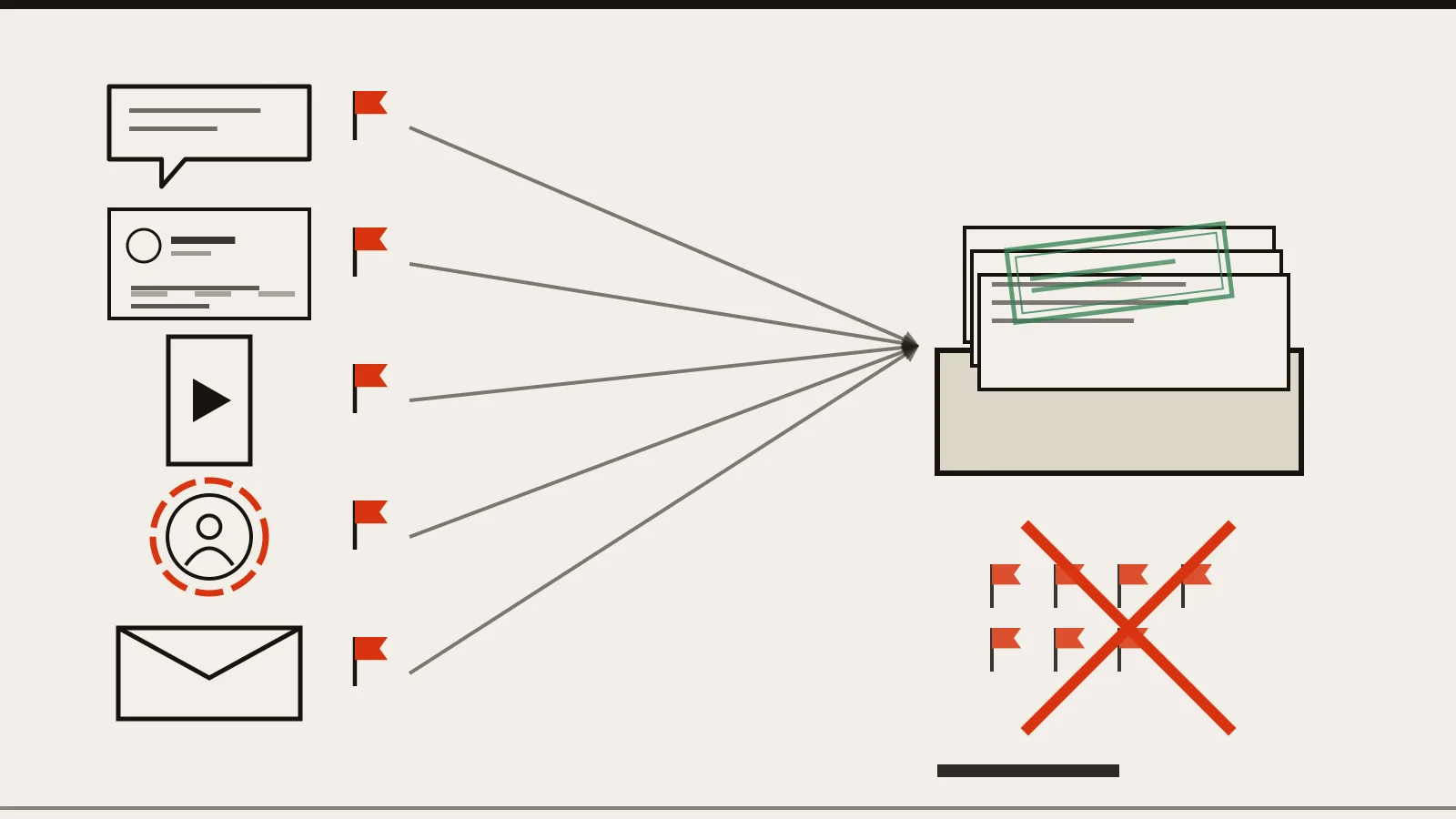
A report on Instagram is a request for review. You point at one item (a comment, a post, a reel, a story frame or a message), choose the rule you think it breaks, and Instagram's review system checks that item against that rule. That is the whole transaction. You are not voting, and nothing accumulates in your favour if your friends file the same complaint. Instagram's Help Centre states it in one line: "The number of times that something is reported doesn't determine whether or not it's removed from Instagram" (Instagram Help Centre). The person who posted it is not told who complained either, since "the account that you reported won't see who reported them." So when people ask what does reporting a post on Instagram do, the honest answer is narrow: it puts one item in front of a reviewer under the heading you picked, and the heading matters more than anything else you do.
That last point catches people out. Pick "I just don't like it" and the item is judged against nothing at all.
It also explains why the shortcuts sold online fail. The pitch behind an Instagram spam report bot is that a few hundred identical complaints force a removal, and the people who ask us does mass reporting work on Instagram have usually paid for exactly that before they arrive. The volume buys nothing. What moves a reviewer is a correctly chosen item and a correctly chosen rule, and that is also the only lawful version of how to get someone banned on Instagram: removals that add up to strikes on the account.
Five report buttons, side by side
Each kind of item has its own button, its own clock and its own way of vanishing before anyone reviews it. As of October 2026 the layout in the app looks like this:
| Item | Where Report sits | What can make it vanish first |
|---|---|---|
| Comment | Press and hold the comment | The author or the post owner deletes it |
| Post or reel | Options (three dots) above it | The poster archives or deletes it |
| Story | Icon at the top of the story | It expires after 24 hours |
| Message | Press and hold the message | The sender unsends it |
| Account | Options on the profile | A rename or deactivation |
The last row belongs to a different page. Reporting a whole account is a separate job, covered in our guide to the Instagram account removal service and the four objects it can target. Everything below stays at item level.
How to report an Instagram comment on a phone or a computer
Most guides still tell you to swipe left on a comment. Instagram's own instructions for iPhone and Android say no such thing, and on current builds a swipe usually does nothing. Here is the sequence the Help Centre gives (Instagram Help Centre, comment reports):
- Tap Comments below the post.
- Tap and hold the comment you want to report.
- Tap Report.
- Choose the reason that matches the comment, then follow the on-screen steps.
On a computer the button hides until you hover. Move the pointer over the comment, click Options below it, then Report. That is the full answer to how to report Instagram comment abuse on any device, and it works whether the comment sits under your post or a stranger's.
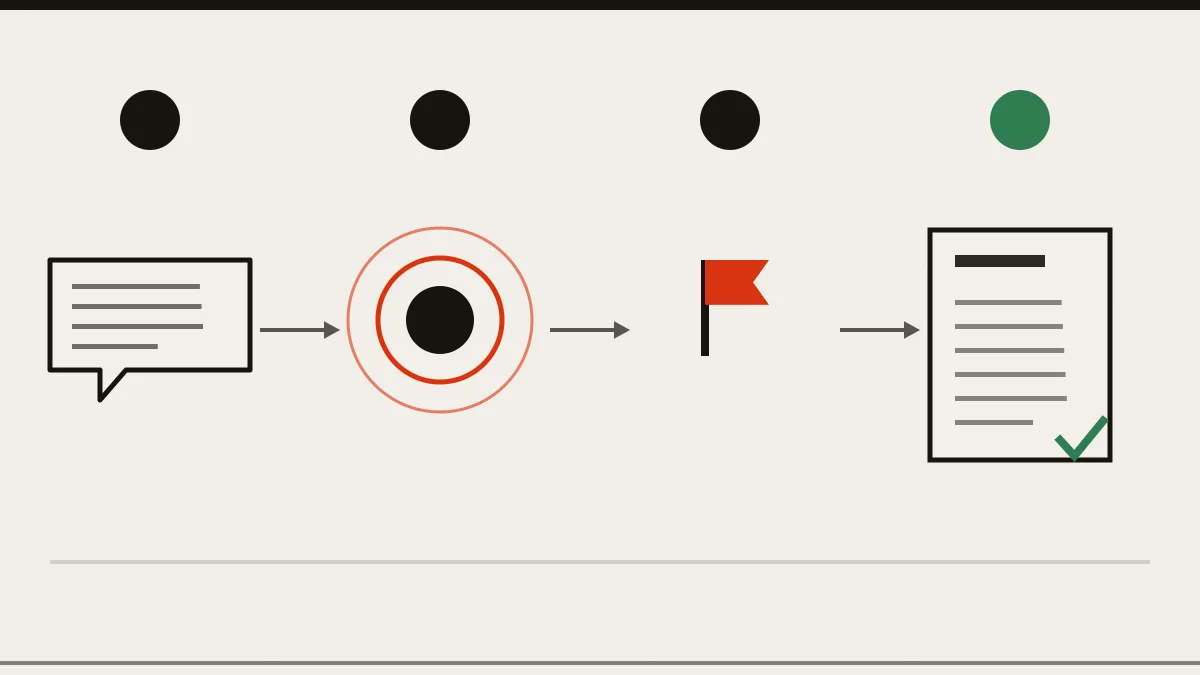
Where the comment sits changes what else you can do. Under your own post you are the moderator as well as the reporter. You can delete it yourself, restrict the commenter so their future comments are visible only to them, or select a batch of comments and remove up to 25 at once, a bulk tool Instagram announced in May 2020 (Instagram, 12 May 2020). Under someone else's post you can only report comment Instagram-side and wait, because the post owner and the commenter are the only two people who can delete it.
Don't read too much into what happens next on your screen. Instagram says that after you report a comment, "you'll no longer see it, but this doesn't mean that the comment was removed by Instagram." It has been hidden from you. The decision comes later.
A word on the reason menu. An Instagram comment report filed under "bullying or harassment" is judged against Meta's bullying policy, and that policy treats public figures differently from private individuals. So say who the comment is aimed at, if the flow lets you. When we file these for clients, the reason chosen is the narrowest one that fits, never the most dramatic.
One practitioner caution. When something is reported as hurtful, Instagram may send its author a notice showing "the content that was flagged", with the option to delete or keep it, and that notice can arrive "even if your content doesn't go against our Community Standards" (Instagram Help Centre). If the comment was addressed to you and nobody else, the author can work out who complained. Capture it first. Our separate briefing on reporting an Instagram comment or photo about you covers that capture step in detail.
Other platforms run the same item-level logic with different buttons. A reply on X follows the route for how to get a tweet taken down, while a defamatory comment on a professional profile usually needs LinkedIn defamation removal rather than a generic report.
How to report an Instagram post or reel someone else uploaded
The Help Centre steps for posts are short: in the app, tap Options above the post, tap Report, then follow the on-screen instructions; on a computer, click Options in the top right of the post (Instagram Help Centre, post reports). A carousel is reported as one post, so you cannot single out slide four. If only one image in a ten-image carousel is the problem, say so in any free-text box the flow offers, because the reviewer sees the whole thing.
People search for how to report someone post on Instagram as if the account were the target. It isn't. Report the post first, then decide separately whether the account deserves a report of its own.
Reels work the same way. Open the reel, tap the three dots (on some builds you tap and hold the video instead), then Report. If your aim is to report Instagram reel to remove it, the reason you pick is the whole game. Two details matter:
- The audio is a separate item. A reel that uses your recording, or a track you own, needs an intellectual-property report, not a community one. Removing the reel does not remove the sound from other reels that reuse it.
- Remixes are separate posts. Each remix that copies the offending clip has to be reported in its own right.
That is how to report Instagram post and reel abuse cleanly: one item, one rule, one report.
The same discipline applies across apps. The routes for how to take down a TikTok video, for how to get a YouTube video taken down and for how to take down a Facebook post all start by naming the exact item, and they all stall when the filer reports the account instead.
How to report an Instagram story, and can you do it anonymously?
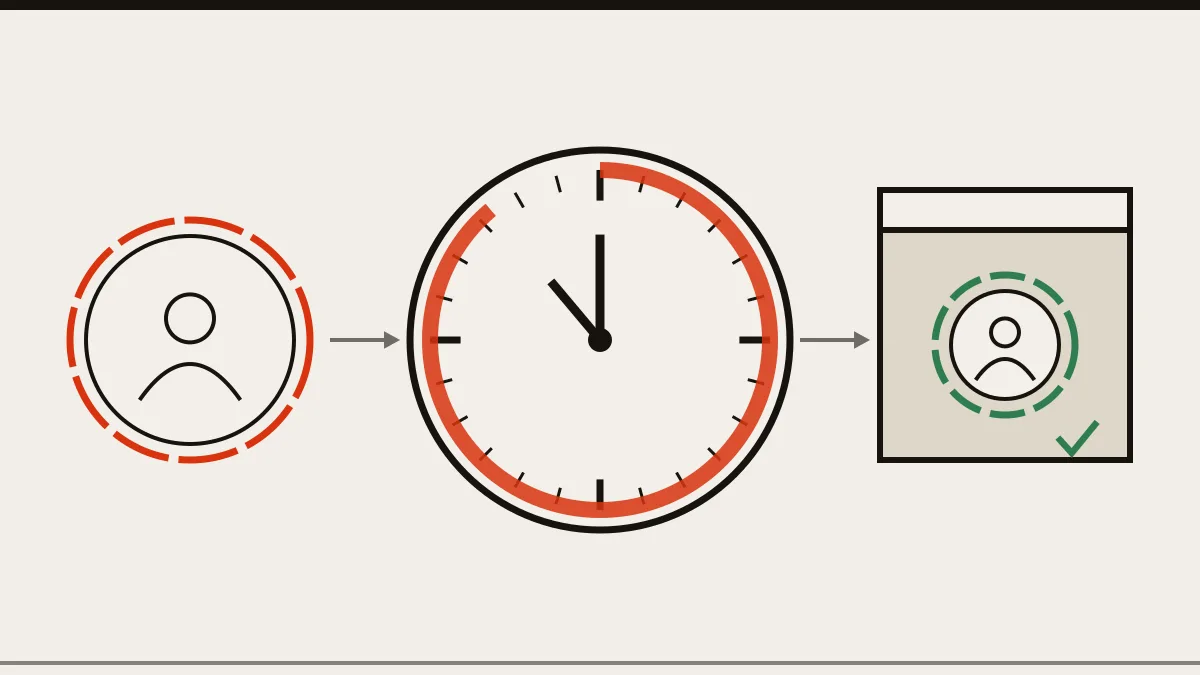
Stories are the item with a deadline. Open the story, tap the three-dot icon at the top of the screen, tap Report, then choose the reason (Instagram Help Centre, story reports). The report covers the frame you are looking at, not every slide the person posted that day, so report each offending frame.
The clock is what makes this different. A story disappears for viewers 24 hours after it goes up, unless the poster saves it to a Highlight on their profile. If it has expired and was never highlighted, there is usually nothing left on screen to press. That is why the question of how to report a story on Instagram is really a question about speed: screenshot it, note the account handle and the time, then report it while it is still live. However you phrase the search, how to report Instagram story content always comes back to those three taps and that one deadline.
If someone posts a story about you, the steps are the same as for any story. Someone else's story is not treated differently from a public post. What changes is the reason you choose. People type how to report someones story on Instagram and report someone Instagram story as if there were a special form for it. There isn't; the button at the top of the story is the form.
Now the anonymity question, which is where most guides overpromise. Can you report an Instagram story anonymously? Formally, yes. The person is not told who reported them. In practice, stories carry a viewer list. If the story was shared with a Close Friends list of twelve people, or you were one of four viewers, the poster can narrow it down in seconds once the story is removed. So you can report Instagram story anonymously in the technical sense, and still be identifiable in the social one. If that risk matters, block or restrict first, capture the frame, and let a third party report it.
To report an Instagram story that sits in a Highlight, open the Highlight from the profile and use the same icon. Highlights do not expire, which is the one piece of good news in this section.
Snapchat has the same 24-hour problem, and our page on how to take down a Snapchat story deals with the even shorter window there. The account-level picture on that app, including how to get someone banned on Snapchat, runs on the same evidence-first rule.
How to report an Instagram message, and why "Report a problem" is the wrong button
Messages are the one item where Instagram reads beyond the thing you point at. To report a single message on a phone, tap and hold it, tap Report, choose a reason, then tap Submit report. To report the whole conversation, tap the person's name at the top of the chat, then tap Options in the top right and Report. On a computer, hover over the message and click Options next to it, or click More information in the top right to report the chat (Instagram Help Centre, message reports).
What Instagram reviews is spelled out: it "reviews up to 30 of the most recent messages sent in reported conversations." Deleted, unsent or edited messages can be included as well, if the entire chat or a message next to them is reported. That line is the practical tip of this whole section. If someone sent something vile and then unsent it, report the conversation or the message beside the gap instead of giving up because the original has vanished.
So how to report Instagram message abuse well comes down to choosing between two buttons:
- One message (a single threat, one explicit image): report the message.
- A pattern (twenty messages over a week): report the chat, so the reviewer sees the run of it.
Screenshot further back than thirty messages yourself, because the review stops there.
Now the wrong button. Search for report problem Instagram message and you will probably land on Report a problem, found under your profile, then Menu, then Help. It exists for things that are broken, and Instagram's own wording is to "go back to where you saw the problem and shake your phone to report the issue" (Instagram Help Centre, Report a problem). It goes to the people who fix bugs. A threatening DM sent there is not reviewed against the Community Standards, and nobody takes it down; the same page sends abuse reports elsewhere. If the problem is what a message says rather than how the app behaves, use Report on the message itself.
Blocking and reporting are separate actions. Blocking stops the contact; reporting asks for a review. If you want to report Instagram direct message abuse and block the sender, report first, while the messages are still in front of you.
Encrypted messaging apps handle this differently, because the company cannot read the chat unless a participant hands messages over. That constraint shapes how to ban someone from WhatsApp, it is why anything sold as a WhatsApp mass report bot has nothing to send, and the Telegram mass report bot trade reaches the same dead end by another road.
If a comment, post or message is defaming you, threatening you or exposing your private life, and the report button has already failed, that is a routing problem, not a volume problem. Ask us for a confidential review. We tell you which route applies before any fee, we never ask for your password or login codes, and intimate-image cases are triaged urgently and free, without anyone needing to see the material.
What happens when you report a comment, a reel or a story?
After you submit, the report enters review. Meta uses automated systems for triage and human reviewers for many decisions, and the outcome takes one of three shapes. The item comes down. The item stays up because the reviewer found no breach. Or the item stays up but is restricted in some way, for example kept out of recommendations. If the item is removed, the poster is typically told that it broke a guideline and which one. They are not told who reported it.
So what happens if you report a comment on Instagram and it is removed? The commenter sees that a comment was taken down for breaking a specific guideline. Repeated removals count towards restrictions on their account, which is the honest mechanism behind every page explaining how many reports it takes to get banned on IG. Strikes come from removals, not from report totals.
What happens when you report a reel on Instagram is the same, with one difference: reels can be shown to people who do not follow the account, so a reel judged borderline rather than violating can lose that reach without disappearing. You will not be told when that happens.
And what happens when you report a story on Instagram? Usually less than you hoped, simply because the review can land after the 24 hours are up. If the story is removed, the poster gets the same rule-based notice. If it has already expired, the report still stands in your history, and a confirmed breach still counts against the account.
The EU figures put a number on the gap between filing and action. In the first half of 2026, Instagram received 388,783 notices under Article 16 of the Digital Services Act, the formal illegal-content route, and took action on 68,147 of them: 1,820 on legal grounds and 66,327 under its own terms (Meta regulatory transparency reports, Instagram DSA report published 28 August 2026). That is about 17.5%. Those are formal notices, mostly from people who took the trouble to fill in a legal form, and still more than four in five produced no action. In-app reports are not broken out the same way, but nothing suggests they fare better.
The ratio is not a reason to give up. It is a reason to file properly. Every other network shows the same pattern, which is why sellers keep losing the argument: the story behind does mass reporting work on TikTok, the daily quota behind a YouTube mass report bot, the scripts behind a Facebook mass report tool, the missing endpoint behind a Snapchat mass report bot and the rented accounts behind every X mass report bot. One queue, many sellers, the same result.
Where an account does go, it goes because confirmed breaches stacked up. That holds for how to get someone banned on TikTok and for how to get someone banned on Twitter alike. Our companion piece on what happens after you report someone on Instagram follows both sides of that timeline.
How to see your account report history on Instagram
Instagram keeps a record of the reports you file. In the app, go to Settings, then Help, then Support requests, then Reports; on a computer the path starts from More at the bottom left (Instagram Help Centre, report status). Each entry shows what you reported and, once it has been reviewed, whether action was taken. That screen is the answer to how to see account report history Instagram users keep asking about.
It has a gap, and Instagram admits it: "Every report that you've made may not be viewable in Support requests." Reports made through a web form (copyright, privacy, impersonation) usually come back by email instead, so keep those emails in one folder.
A habit we ask every client to copy: screenshot the Support requests entry on the day you file and again when the decision arrives. A solicitor, a regulator or an out-of-court body will want dated proof that you used the platform's own route first, and Instagram's screen will not keep that for you forever.
If a decision looks wrong, you can usually ask for another review from the same screen. When Instagram has reviewed something twice and still left it up, some decisions can then go to the Oversight Board, which allows 15 days from the final decision (Instagram Help Centre). In the EU there is a further step: an out-of-court dispute body such as the Appeals Centre Europe, which charges users no fee (Appeals Centre Europe).
Facebook keeps a parallel record in its own support inbox, and its account-level rules differ in places; our page on how do you get someone banned from Facebook sets out what Meta acts on there.
How do you get someone's Instagram post deleted when a report isn't enough?
Three parties can delete a post that isn't yours. The person who posted it. Instagram, acting on a report or a form. And, in a narrow set of cases, a court or regulator whose order the platform has to follow. Every route to getting a post deleted runs through one of those three, which is why the searches all land in the same place. Whether you type how to get someone's Instagram post deleted, how to get someone's post deleted on Instagram or get someones Instagram post deleted, the answer is a choice between those parties.
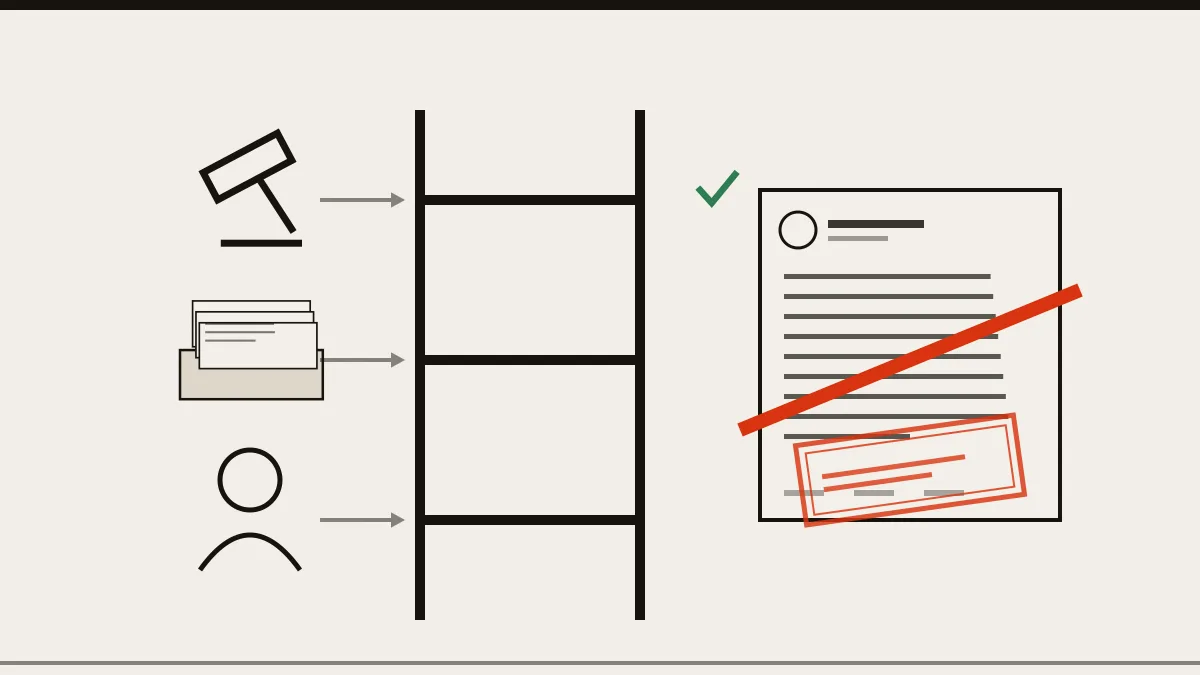
The poster. Often the fastest. A calm, specific request (which post, why it is wrong, what you want removed) settles a surprising share of cases, especially between people who know each other. Keep it in writing and keep it short.
Instagram. The report button for community-guideline breaches; dedicated forms for privacy, intellectual property and impersonation. The forms reach a different team from the in-app menu and ask for different proof.
A court or regulator. For defamation, harassment or a privacy claim that Instagram will not act on, a solicitor's letter or a court order changes the position. In the UK, the Online Safety Act also requires platforms to run accessible complaints procedures, though Ofcom does not take up individual cases. This is the slow, expensive rung. It is also the only one that works against content Instagram has already reviewed and kept.
So the answer to how to get someone else's Instagram post deleted is rarely "report it harder". Searchers who type how to get someones Instagram post deleted, how to get someones post deleted on Instagram or how to get someone elses Instagram post deleted are asking the same question, and the ladder above is the same for each of them. Our wider guide to Instagram account takedown shows where removal ends and suppression begins once the target is a whole profile, and the X equivalent sits in the case for how to remove a defamatory tweet.
How to report someone on Instagram for using your photos
Which form you need depends on how the photo is yours.
- You took it. That is copyright. Use Instagram's intellectual-property route, not the in-app menu. Be aware that your name and contact details can be passed to the person you report, which is the main exception to report anonymity.
- You are in it, but someone else took it. That is privacy, not copyright. Instagram's privacy report form is "reserved for people reporting potential violations of their privacy concerning their image or video" (Instagram privacy form). Meta's own rules are stricter for minors than for adults here.
- They are posing as you with it. That is impersonation, which has its own form and its own proof of identity.
People asking how to report someone on Instagram for using your photos often file a copyright report for a photo a friend took of them, and it is refused. Our comparison of the Instagram impersonation report and the copyright form walks through that choice with examples.
Can a paid service or a report bot get the post deleted faster?
No. Every seller in this market sells the same thing under different names: reports, sent in volume, to a queue that ignores volume.
We have looked at the trade on each network. An Instagram ban service sells access to that queue, nothing more. A TikTok ban service charges for an outcome it cannot control. A Twitter ban service runs on rented accounts that X removes in batches. A Facebook ban service leaves the buyer carrying the legal risk. A YouTube ban service cannot issue the copyright strikes that actually end channels. A Telegram ban service files the same abuse email anyone can send. And a WhatsApp ban service cannot read a single encrypted message, whatever it charges.
There is a harder limit too, and we would rather state it plainly. Some posts cannot be removed by anyone acting lawfully. Truthful reporting, genuine public records and honest opinion stay up, however much they hurt. For those, the realistic options are a right of reply, an update from the publisher, or suppression: pushing better material above the post in search results, without pretending it has gone. We never forge copyright notices, never send legal threats a client cannot back, and never ask for anyone's password. Where a forged notice gets noticed, the result is usually more attention on the very post you wanted gone. Our disclaimer sets out what we can and cannot promise, and the team behind these briefings handles the legal end when a report is not enough.