What does YouTube treat as a "user account"?
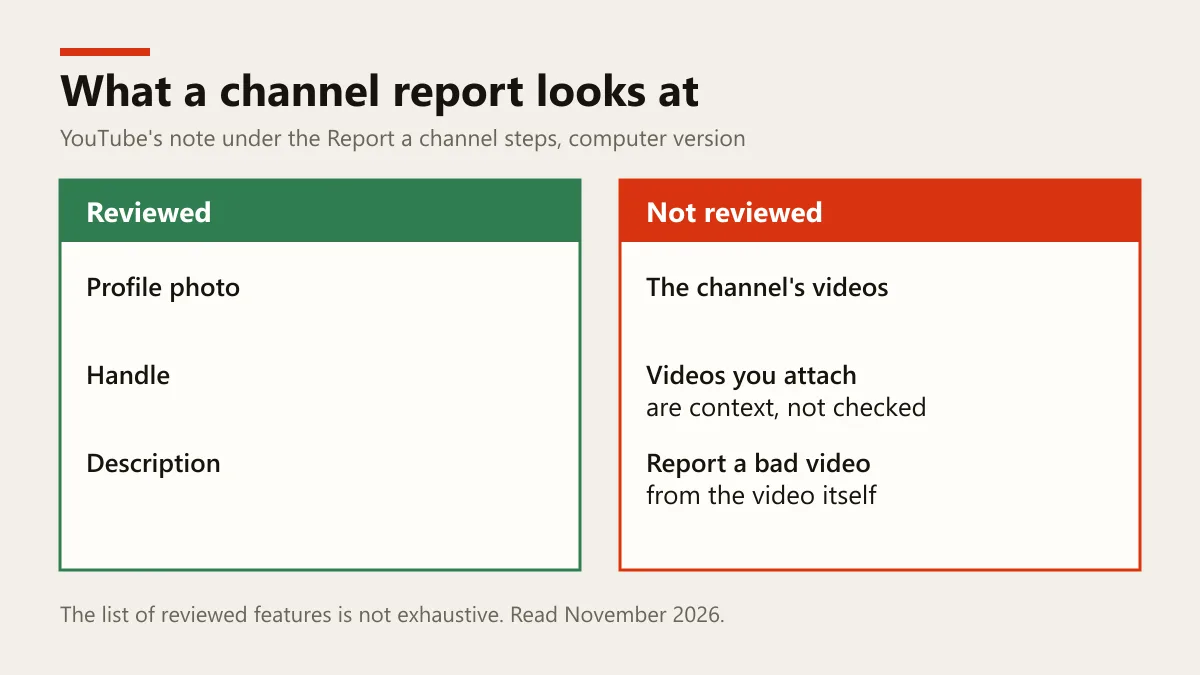
A YouTube user account, for reporting purposes, is the channel: the public identity made up of a handle, a display name, a profile picture, a banner and a description, whether or not it has ever uploaded anything. YouTube's help page files the subject under "Report a channel" and then labels the button Report user, which is why people hunting for a separate way to report a YouTube user never find one. The detail most guides skip sits in a note under those steps. When you report a channel, YouTube says it does not review the channel's videos. It looks at features such as the profile photo, handle and description, and any videos you attach only help it understand the channel (YouTube Help, report videos, channels and other content). A channel report is therefore a judgement on the identity shown on that page, and it is no sweep of everything the person has posted.
That note changes how you prepare.
It also changes the vocabulary. Anyone asking how to report someone to YouTube is really asking how to put an object in front of a reviewer. Nobody reviews a human being, their motives or their reputation. A reviewer looks at an object (a channel page, a comment, a chat message, a video) and asks whether that object breaks a named rule. Other platforms sort differently: on Instagram, how to report an Instagram account depends partly on the type of account in front of you. On YouTube, the sorting question is what the account did.
How can I report someone on YouTube if all I have is what they did?
Start with the behaviour, because each kind has a different door, a different evidence pack and sometimes a different answer to who may file.
| What the account did | Door | Evidence that helps | Who may file |
|---|---|---|---|
| Pretending to be you | Impersonation form. Add a privacy complaint if it uses your face, voice or personal details | Your real channel link, the fake's link, copied picture or banner, screenshots of messages sent in your name | You or your representative. Privacy complaints are largely first-party |
| Pretending to be another creator | Impersonation form | Both channel links, the near-identical name or handle, the copied branding | Anyone. The policy covers "yours or another creator's channel" |
| Taking money | Report the comment, video, Short or channel under the closest scam or spam reason, then call your bank | The exact comment or video, the destination link, payment record, dates | Any signed-in viewer can report. Only the payer can dispute the payment |
| Automated or bot behaviour | Report each comment or chat message. Report the channel when there are a few | Identical text, timestamps, the videos it appeared under | Any signed-in viewer |
| Targeting you | Harassment reason on the item, or on the channel if there are many. Privacy complaint for your contact details. Police for threats | Screenshots with links and dates, a short timeline | Anyone can flag. The privacy route is for the target |
Sorting this way matters because a report is only as useful as the rule it points at. Suppose a channel copies your avatar and also posts comments urging people to "claim a prize" through an outside link. Those are two problems: the channel's identity is impersonation, while each comment is a scam under the spam rules. Filing one vague complaint about "this awful person" asks a reviewer to do your sorting, and the channel report would not look at the videos anyway. Filing the impersonation form for the identity and flagging the two worst comments separately gives each reviewer a single question to answer. People who report someone on YouTube often assume that more detail about the person's character helps. It rarely does, since reviewers assess the item against the rule and character is no part of the test. Write what the account did, where it did it and which rule that touches. Then stop. Two precise reports will usually say more than a long grievance.
The question of standing varies a good deal between platforms, and YouTube is more open than some on impersonation. Our comparison of who is allowed to file sets it against other services. Harassment works the same way in principle, though Instagram has built its own four lanes for harassment and abuse and the labels do not carry over.
How to report YouTube account pages, comments and chat messages
Keep this short: you need to be signed in, and the computer version of YouTube's help page is the one that spells out the channel route. When we read the Android version in November 2026, it listed videos, Shorts, comments, posts, live chat and conversations, but no separate channel section. So whether you need to report a YouTube account once or are working out how to report YouTube accounts for a team, use a browser on a computer.
- Channel: open the channel page, click "…more" in the description, click Report user, then choose between Hide user from my channel, Report channel art, Report profile picture and Report user. Pick a reason, add detail if asked, submit.
- Comment: on the video, click More beside the comment, then Report, then the reason.
- Live chat message: point at the message, click More, then Report, then the reason.
Hide user from my channel sits in that same list and is easy to mistake for a report. It only stops that person's comments showing on your own channel, which is useful if you run one and a repeat offender keeps turning up there. It reaches no reviewer. If you want a review as well, finish the report too. Creators get a second chance at the tick-box after reporting a comment, labelled Hide user on my channel. A separate warning applies to report YouTube account attempts aimed at the uploads themselves. Since the channel review skips videos, a report that says "all their videos are scams" points the reviewer at something they have said they will not check. Attach two or three as context if they prove the account's purpose, then report the worst ones from the video itself. Reporting paths differ for adverts, which is why we cover how to report a YouTube ad on PC separately.
What does the YouTube impersonation policy actually say?
The YouTube impersonation policy bars unauthorised imitation of a person, an entity or a channel where that could mislead viewers and harm the community. Four things count, in YouTube's framing: deceptively copying branding, content or usernames; workarounds such as typos, special fonts and extra punctuation; copying profile pictures, banners or colour schemes, even when the copy is less than perfect provided the intent is clear; and using AI to copy a voice or likeness so that a channel seems owned or authorised by that individual. The named examples are specific. A channel adds "Real" or "Official" to its name. Another poses as a backup by adding "Backup", "Shorts" or "Live" to a creator's name. A third uses a phonetically identical handle or a deceptive misspelling. Comments count too, where they make people believe the commenter is someone else, and so does reposting a creator's videos as your own without change or significant commentary (YouTube Help, impersonation policy).
Three limits matter just as much. Fan channels are allowed if they say so in the channel name or handle. YouTube weighs parody, satire and whether the subject is a public official or well-known person. And the stated remedy is conditional: if YouTube decides a channel was set up to impersonate, it may be removed.
Report impersonation on YouTube: the form and who may use it
The policy page links to its own form at support.google.com/youtube/contact/impersonation. Sign in first. Opened signed out in November 2026, that address simply sent us back to the policy page, so a person who clicks it from a search result can believe the form has vanished. We could not read the signed-in fields, so we will not list them here. Gather your own channel link, the fake's link and what was copied before you start.
Anyone can use this route where a creator is being copied, not only the victim. That sets it apart from the privacy process, which generally refuses claims made for someone else apart from narrow cases such as a parent, a legal representative or a vulnerable person who cannot file (YouTube Help, privacy complaints). If an AI clone of your voice or your home address is the problem, you are in privacy territory, and you must generally file yourself. Businesses should note that the privacy route does not take company complaints, while the impersonation policy names entities and says YouTube enforces trademark holder rights.
Other services ask for different proof. A Twitter impersonation report comes with its own clean-up work, how to report a fake TikTok account turns on proof of copying, and an Instagram fake account report has no button with that name at all. For a persona run across dating apps, the Grindr catfish report route is the nearer model.
Report fake YouTube channel or report fake YouTube account: is there a difference?
No. People use both phrases, and YouTube's own label is neither: the button says Report user, so a search to report YouTube user pages leads to the same place. Choose the route by purpose. To report fake YouTube channel pages that copy someone real, use the impersonation form. To report fake YouTube account activity with no real person being copied, such as a nameless channel that exists to push a crypto link, use Report user and the closest spam or scam reason. YouTube's transparency report says a channel can be terminated when it is wholly dedicated to violating the guidelines, naming spam accounts as a common case (Google Transparency Report, removals). Being anonymous is not the offence. Plenty of faceless channels break nothing.
When the fake also holds your video: a different door
Copying your name is impersonation. Re-uploading your video is copyright. These run separately, and the second route belongs to the owner: YouTube says copyright owners or their authorised representatives should file, through the removal request in YouTube Studio or by email (YouTube Help, copyright removal requests). A bystander who spots a stolen upload cannot usefully file it. Expect a real trade-off on names too, covered further down. If the copied channel is the bigger issue, see whether you can report a YouTube channel for copyright or only its individual videos. And if the fake has spread to its own website, the host and registrar come into play, which is the ground an impersonation website takedown covers.
If several of these overlap and you would like someone to sort the routes with you before anything is filed, Obscura takes confidential reviews. Obscura can prepare the paperwork where the facts support it, and YouTube makes the final decision.
How to report a scammer on YouTube, from fake giveaways to fake support
A scammer on YouTube usually appears in one of four forms: a reply posing as the creator that promises a prize, a video pretending to be a company or government service, a channel pushing get-rich-quick schemes or invented jobs, and a comment listing a fake customer support number. YouTube's spam policy names scams as schemes of those kinds, aimed at private data such as bank details, passwords or government IDs. Its worked example is a video posing as a real company or government service that tricks viewers into clicking for a "free payout". The word giveaway does not appear on the policy page we read in November 2026, so do not hunt for it as a label. A fake giveaway will usually be caught by the comment-spam wording, the scam wording or the impersonation rule on deceptive comments (YouTube Help, spam policy). How to report a scammer on YouTube therefore comes down to which object carries the lie, and then which reason best matches it.
So how to report a scam on YouTube in practice? Report the comment if the lie is in a comment. Report the video if the lie is in the video. Move to the channel only when the policy's own threshold applies: YouTube says that if you have found a few videos or comments on the same channel, you can report the channel. Note the link, the channel handle and the date before you click, because a removed comment takes your evidence with it, and the bank may want that later.
Do not click the destination link to investigate it. Copy the address instead.
Scale is worth knowing, as long as you do not misread it. Google's figures for April to June 2026 show 2,732,395 channels removed, of which 84.5% (2,310,181) fell under spam, deceptive practices and scams (Google Transparency Report). Most of that is automated clearance of spam networks. Your report still helps where a scam has slipped past, but the figure says nothing about how quickly any single report gets read.
Paid placements take a different path. For the advert angle, including what carries a statutory clock, read our note on YouTube scam ads and X impersonation.
What if money has already gone?
Call your bank or card issuer first, then report to the police route for your country, and only then deal with YouTube. A report to YouTube can remove a channel, but it does not return money and YouTube is not party to your payment. Speed matters most with the institution that moved the funds. In the US, the Federal Trade Commission's guidance sorts the first call by payment type: card issuer or bank for cards and transfers, the gift card issuer using the number on the back of the card, the exchange or ATM operator for cryptocurrency, then a report at ReportFraud.ftc.gov (FTC, what to do if you were scammed). The FBI's Internet Crime Complaint Center takes cyber-enabled crime complaints too, though it says it cannot guarantee a response. In England, Wales and Northern Ireland, Report Fraud replaced Action Fraud in December 2025, on 0300 123 2040 or at reportfraud.police.uk. Police Scotland takes reports on 101, according to the City of London Police launch notice.
Keep the payment record, the channel handle, the comment text and the date of contact together. Those four details are what each of these bodies will want first.
Which payment you used decides what can come back. Our note on a Roblox scammer or a payment outside Vinted covers what a scam report can and cannot return, and the Airbnb scam and Bluesky impersonation breakdown shows how one fraud can land on three separate desks.
One warning. Anyone who contacts you after a loss offering to recover your funds for a fee is very often the second stage of the same scam. No legitimate route needs your password, and no honest firm can promise recovery.
How to report bots on YouTube, and why volume does not help
YouTube's rules treat automated behaviour under several headings. Comment spam covers high-volume, repetitive or deceptive comments and live chat messages used to drive traffic or engagement, such as identical "take a look at my channel" messages across hundreds of videos. Engagement manipulation names bots directly, alongside coercion and rewards offered for likes, views or subscribers. The fake engagement policy separately bans artificially raising views, likes or comments through automatic systems, and warns that a channel may suffer for what a hired promoter does (YouTube Help, fake engagement policy). So how to report bots on YouTube is mostly a matter of picking evidence of the pattern, since you cannot prove what software sits behind a username. Report three or four identical comments or chat messages on the items themselves, using the spam reason. If they come from one channel, report the channel too and describe the repetition. Do not claim you know it is a bot. Say what you saw.
Most of this never needs you. For April to June 2026, Google reports 1,551,576,962 comments removed for breaking the guidelines, and its chart attributes 99.9% to automated flagging as the first detection. Your flags help most with the ones that get through, particularly in a live chat that is moving too quickly for anybody to moderate by hand.
Report numbers do not decide anything. YouTube's help page says reported content is not taken down automatically and that a video with no violation stays up, however many flags it collects. That is the same conclusion our review of mass report Twitter account bot sellers reached on X. Buying more reports buys nothing a reviewer counts.
Who learns your name, and what can no report do?
An ordinary report is anonymous: YouTube states that other users cannot tell who made it. A privacy complaint carries a similar promise, as YouTube says it will not share your name or contact details with the person who posted the content, and updates go to the email address you gave. Copyright is the exception that surprises people. Under the removal request page, the uploader can ask for your name, primary email and the description of the work, your physical address and phone number stay confidential unless a lawsuit requires them, and if a video is removed, the claimant's name appears on YouTube in its place. Legal forms carry their own warning, since abuse may cost you your Google Account. The signed-in impersonation form is the one we could not read, so check what it says about sharing before you submit. If staying unknown matters more than speed, report the conduct, then have a representative consider the copyright route.
No report removes everything, and it would be dishonest to suggest otherwise. Truthful reporting, public records and protected opinion can stay online however unpleasant they are, and for those the honest tool is suppression rather than removal. Parody and clearly labelled fan channels may survive. A removed channel does not stop the same person opening another, and it does not unmask them.
Obscura does not take reports aimed at rule-abiding people, false reports, bots or report volume, and report volume does not decide outcomes in any case. Obscura will not forge a notice and will never ask for your password. YouTube makes the final decision on every case. Our disclaimer sets out those limits, and our about page says who we are.
When we prepare these cases, the channel link, the original being copied and one clear sentence on which rule is engaged tend to do more than a long history of the dispute. That is general practice, not a promise of any result.
If the content sexualises a child, do not report it through this sort of channel alone and do not save a copy. Go to NCMEC's CyberTipline in the US or the Internet Watch Foundation in the UK, and call the police if a child is in danger now. If anyone threatens you, go to the police first and report on YouTube afterwards.