A channel where no single video is the problem
Take a hypothetical. A channel's name borrows a charity's wording, its avatar is a doctored logo, its description sends viewers to a payment page, and every upload, watched alone, is dull. You could flag forty videos and each might pass.
The harm sits above the videos.
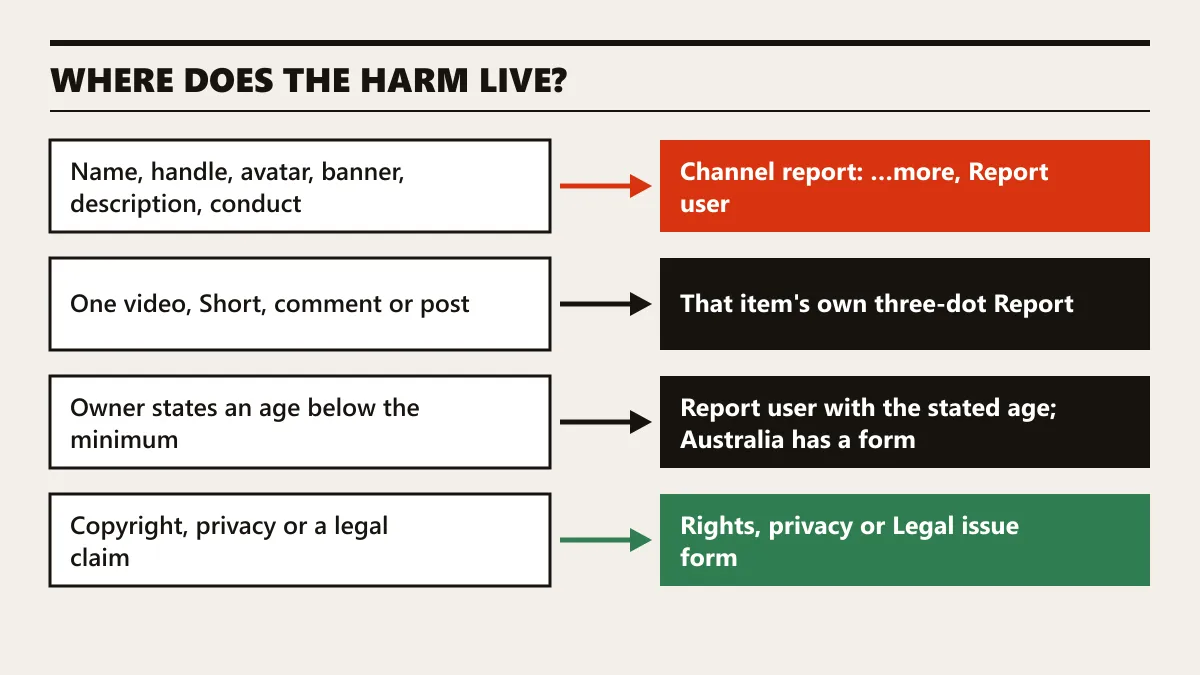
That is the case a channel report was built for, and it settles the first question people ask: can I report YouTube channel pages at all? Yes. YouTube's help page on reporting has a dedicated Report a channel section, and it carries a note most guides leave out: "When you report a channel, we don't review the channel's videos." Videos you attach only help reviewers understand the channel; they are not checked for violations. The features it names as reviewed include the profile photo, handle and description (YouTube Help, read November 2026). So a channel report judges the shell of the channel, plus whatever you explain about the pattern. If you want to know how to report YouTube channel harm, first decide whether the harm lives in that shell or in one upload, because the form will not decide for you.
Searches for how to report YouTube page mean the same thing. YouTube's list of reportable objects runs through videos, Shorts, channels, comments, posts, live chat and ads, and has no separate "page". Meta is the contrast, since an account, a Page and a group are three different reports on Facebook. If your problem is a single clip or comment, the object's own menu is the better-aimed tool, and nothing below will help it.
How to report a YouTube channel on each surface
You need to be signed in. When we looked signed out in September 2026, the channel's panel offered only Share channel.
On a computer: the one surface YouTube documents
People phrase this as how to report someone YouTube channel, how to report someone channel on YouTube, or the shorthand how to report YT channel. All three lead here.
- Sign in to YouTube and go to the channel page you want to report.
- Click …more in the channel description.
- Click Report user.
- Pick the option that fits: Hide user from my channel, Report channel art, Report profile picture, or Report user.
- Select the reason and click Next.
- If the window asks for more, add your details.
- Click Next, then Submit.
Two traps sit in that list. The label Report user appears twice, once to open the dialog and once as the whole-channel choice. And Hide user from my channel is a creator's tool for keeping someone off your own comments, so treat it as a block rather than a report.
Step 6 deserves more care than it usually gets. Because reviewers look at the channel's features and use attached videos only as context, the details box is where the pattern has to be stated in words. When we draft these, we name the field first (handle, avatar, description), then quote the exact wording or describe the image, then say which policy it appears to breach and since when. One sentence on who is harmed helps; a paragraph on how angry you are does not. Give the channel's full URL and handle rather than its display name, since display names can be copied and changed. Paste any link from the description as plain text, with the date you saw it. Keep your own dated screenshot, because a description can be rewritten the moment the owner gets nervous, and YouTube's form does not promise to preserve what you saw. Reporting a YouTube channel well takes about ten careful lines, and none of them needs to be a threat.
How to report a channel on YouTube mobile
Here YouTube's own answer is thinner than most guides admit. The Android and iPhone versions of that help page cover videos, Shorts, comments, Community posts, live chat, ads and conversations, and neither shows a Report a channel section (read November 2026). Any list of steps to report YouTube channel mobile is therefore unofficial, and that includes the next few lines. vidIQ's guide shows the confusion: its body says you can't report a channel on mobile, while its FAQ says the app's three-dot menu holds Report user. We could not confirm either reading on an official page, so use these steps as where to look, not as a documented path.
Report channel YouTube app steps for Android and iPhone
- Sign in and open the channel page in the app, not a video.
- Look for the three-dot menu at the top right of the channel page. The dots beside a video only report that video.
- If Report user is listed, tap it, choose the reason, add details and submit.
- If it is not listed, stop hunting and use a computer, where the path above is written down.
Our note for phones: copy the channel's URL from the app's share option first, so you land on the right channel when you move to a laptop. A TV is no use here, since YouTube describes that report for videos.
YouTube channel violations live in the shell, so show the shell
The table maps common channel-level problems to the option in the dialog and the evidence worth giving. We could not read the live reason list signed out, and labels change, so pick the nearest one offered instead of hunting for our wording.
| What you are looking at | Option, and reason to look for | Evidence to attach or describe |
|---|---|---|
| Name or handle posing as another creator ("Official", "Real") | Report user, nearest impersonation reason; the impersonation form if it fits better | Both channel URLs, both handles, the date each appeared |
| Avatar that is sexual, hateful or copied | Report profile picture | Channel URL, what the image shows, a kept screenshot |
| Banner that is abusive or lifted from someone else | Report channel art | Channel URL, the original's URL if copied |
| Description pushing a scam link or payment request | Report user, spam or scam reason | The wording quoted, the link as plain text, the date |
| The same "take a look at my channel" comment across many videos | Report user, spam reason; flag the comments too | Three to five comment links, what they repeat |
| Sub-for-sub or other engagement schemes | Report user, spam reason | Where the offer appears, quoted |
| Channel apparently built to target one person or group | Report user, harassment or hate reason; flag the worst uploads singly | Name and description wording, example links as context |
| Stated age below the minimum | The under-13 route below | Where and how the age was stated |
Two rows need a neighbour. A clone is a question of who the channel claims to be. YouTube's impersonation policy lets you report "yours or another creator's channel", and our note on YouTube impersonation and scam reports covers that form, much as the clone-and-scam sorting on X does for that platform. Targeted abuse, meanwhile, rarely fits one label; the logic of sorting harassment into lanes on Instagram carries across, even though the menus differ. And a banner that copies your artwork is better treated as a rights claim, so the signed-notice approach for stolen art is the closer model than a flag.
Back to our hypothetical, because a worked entry shows the shape better than advice can. The details box might read: "Handle and name use the wording of a registered charity that has no link to this channel. The avatar is an altered copy of that charity's logo. The description asks viewers to donate through a payment link, pasted here as text, seen on 2 November 2026. I am not asking you to review the uploads; three are attached for context." That is 60-odd words, each one checkable. Compare it with "this channel is a scam, please delete it", which gives a reviewer nothing to open.
Spam report YouTube channel: what the policy names
YouTube's spam, deceptive practices and scams policy reaches beyond single clips. It lists identical promotional comments across many videos, sub-for-sub schemes, channels re-uploading popular clips with no commentary or transformation, and channels using the same background music and repetitive AI-generated imagery across many videos. It also covers coordinated networks of channels. Spam is the largest channel-removal bucket by a distance: 2,310,181 of the 2,732,395 channels removed in April to June 2026, or 84.5%, went for spam, deceptive practices and scams (Google Transparency Report, Q2 2026). Be careful with what that figure proves, because it counts removals, not reports, and says nothing about how a given channel was found. One wrinkle: the spam policy suggests reporting a whole channel when you find several breaching videos or comments on it, whereas the reporting page says channel reviewers do not check those videos. We plan for the stricter reading and file both, one channel report for the shell and individual flags for the worst uploads.
How to report a YouTube channel for being under 13 is a separate question
Age is not a content problem, so the usual reasoning fails. YouTube's Terms of Service set the line at 13, and then add that children of all ages may use the service if a parent or guardian has enabled it. Google's age requirements page gives 13 as the minimum for managing your own account in most countries, with higher ages in some, and says that if Google learns you may not be old enough, you have 14 days to update the account before it is disabled. A child appearing on camera therefore proves very little, since a family channel can be run by an adult. What matters is who holds the account, and the strongest evidence is the holder saying their age. As of November 2026 we found no general under-13 reporting form in YouTube Help, and we would rather tell you that than invent a link. Only one dedicated underage form turned up, and it applies to a single country.
That is the Australian Social Media Minimum Age Act form, which YouTube's Australia page offers to users in Australia for accounts they suspect belong to someone under 16. Elsewhere, use the channel report and borrow that form's structure, because its fields show what YouTube wants to know:
- Open the channel page and follow the Report user path above.
- Choose the nearest reason offered. We could not confirm a dedicated under-13 label, so do not assume one exists.
- In the details, give the channel URL.
- Say how the owner expressed their age: comment, spoken in a video, video description, channel description or other.
- Quote what was said, with a timestamp if it was in a video.
- Say briefly why you believe it, and stop there.
Guessing from a face or a voice is weak and can land on a young-looking adult. Say so if that is all you have.
Safety is a different matter, and it does not wait for this route. If a child may be in danger, Google's family safety guidance says to contact the police without delay. Sexual imagery of a child goes to the NCMEC CyberTipline or, in the UK and many other countries, the Internet Watch Foundation. Do not save, screenshot or forward it. Report the URL.
A report stays anonymous, and termination needs more than a report
YouTube's wording on identity is brief: "Reporting content is anonymous, so other users can't tell who made the report." We found no official page describing a notice sent to an owner because they were merely reported, and what the strikes page describes is a message about the strike itself: "When you get a strike, you're told via email." Expect little back yourself. Reported content is not taken down automatically, and Reporting History is described for videos, so you may have no tracker for a channel report at all. Watch the page, then.
EU readers have one extra lever where the content is illegal, not merely against the rules. Article 16(5) of the Digital Services Act requires a platform to tell a notifier its decision without undue delay when the notice includes contact details. Whether a given in-app report counts as such a notice is less clear, so use YouTube's legal route if you need that answer on record.
The grounds for removal are narrower than people hope. YouTube's termination page gives three: repeated violations across any form of content, a single case of severe abuse such as predatory behaviour, spam or pornography, and dedication to a policy violation such as hate speech, harassment or impersonation. Repeated violations has its own arithmetic in the strikes guidance: a first breach is typically a warning, a second is a strike, each strike lasts 90 days, and three in the same 90 days may end the channel. Notice who decides all of this. It is a reviewer reading the channel against policy, not a tally of how many people complained. Termination removes every video on the channel, 86,686,063 of them in April to June 2026 (Google Transparency Report, Q2 2026), and the owner may appeal for up to one year, with no more than two appeals in that time. That is why a thin report rarely gets there.
The same page bars a terminated owner from using or creating other channels, so a comeback channel is worth a fresh report that links the old one.
Volume does not appear in any of those grounds. For flagged videos, the Transparency Report's flags tab says "Reviewers evaluate flagged videos against all of our Community Guidelines and policies, regardless of why they were originally flagged", which describes a reading, not a vote. Instagram works on similar logic, as our account of what a report against a person can end in sets out, and how Instagram and others handle a whole-account report makes a useful comparison if you work across platforms.
If the channel is aimed at you or your business and you would like a second reader before filing, you can send us the channel link for a confidential review. We don't need your password, and we will say if the honest answer is that no report fits.
Wrong doors, and what a channel report cannot do
A channel report is one door among several, and the wrong one costs you time without warning you that it has.
- Your work was copied. Copyright runs on a rights-holder's notice against specific items, and whether you can name a whole YouTube channel in one is a separate point.
- Your face, name or details appear. Use the privacy complaint process, where YouTube says it won't share your name or contact information with the person who posted the content.
- A legal claim such as defamation. Under the content or channel, use More, Report, then Legal issue. YouTube warns that abuse of its legal forms may terminate your Google Account.
- An advert sits on the channel. Ads are a separate system with their own report route, and who may file depends on the complaint.
- The channel is on another platform. Telegram's channel and account reports have their own menus and their own reach.
Now the limit, which is the part a report seller will not tell you. A channel that criticises you truthfully, reports accurately on public records or publishes protected opinion breaks no rule, and flagging it removes nothing. For that material the honest options are lawful suppression, or a reply, never a forged notice. Obscura does not take reports aimed at rule-abiding people, false reports, bots or report volume, because volume does not decide outcomes and YouTube makes the final decision. The tools sold for this fare no better elsewhere: we have looked at the products behind Telegram report bots, their TikTok equivalents and a bench of Instagram report apps, and the same warning signs repeat, a request for your login among them. We never ask for passwords and we promise no removal. Our disclaimer sets out those limits, and who writes these briefings is public.
What a good report can do is smaller and real: put accurate evidence about a channel's shell in front of the person whose job is to read it.