How to Close a Facebook Account When Someone Dies: 2 Paths

Here is how to close a Facebook account when someone dies: send Meta its special request form for a deceased person's account with proof of death, such as a death certificate or obituary. Anyone with proof can ask Meta to memorialise the profile. Removal is stricter: only the legacy contact, or verified immediate family or an executor, can request it. Nobody is given the login, and Meta publishes no processing time.

EW
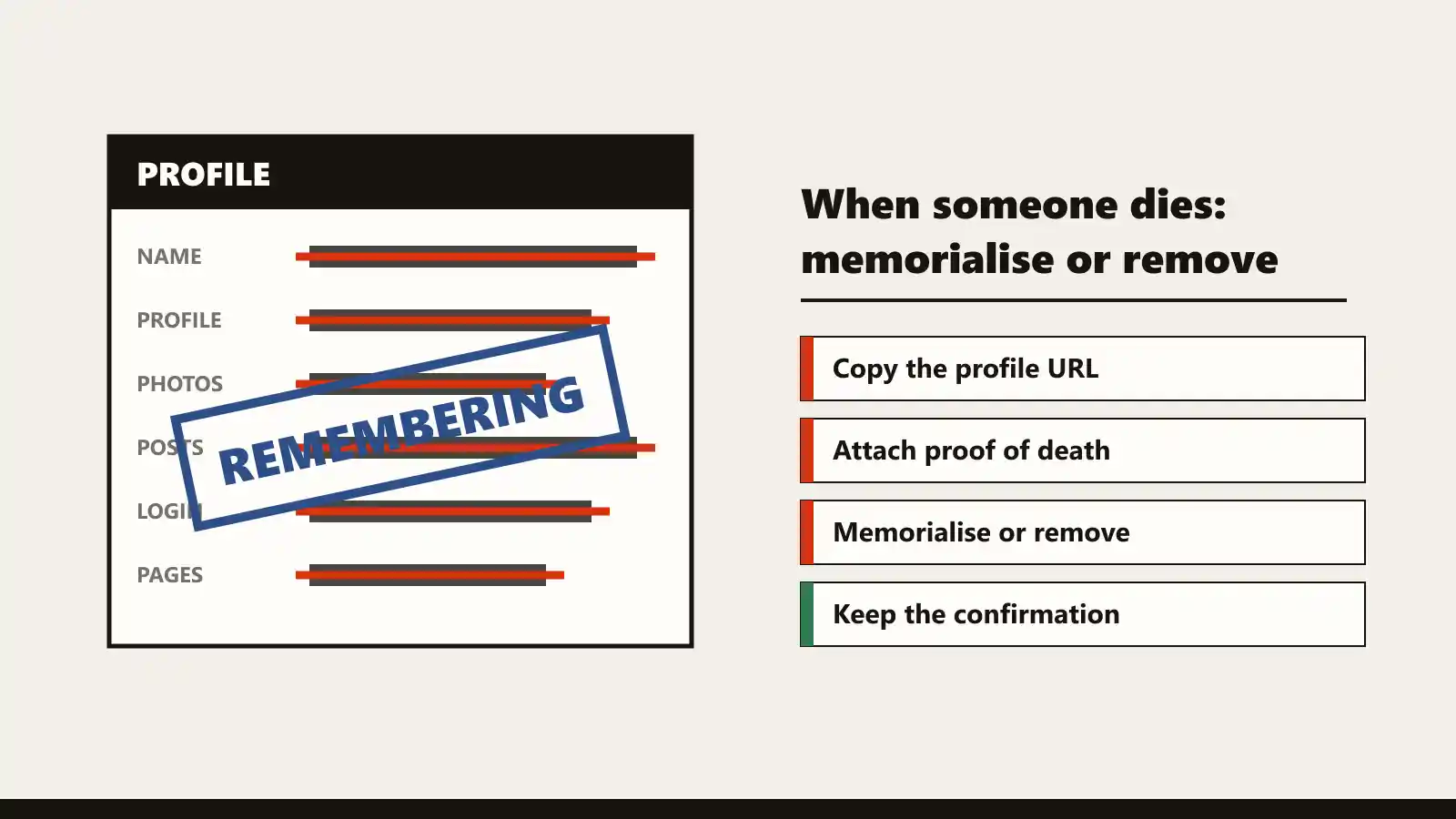
How to close a Facebook account when someone dies: a profile card stamped Remembering, beside four steps to memorialise or remove it.

What happens to a Facebook account when someone dies?

Nothing, until someone tells Meta, which is why knowing how to close a Facebook account when someone dies starts with a report rather than a password. Facebook does not learn of a death from registries or obituaries, so the profile keeps sending birthday reminders and friend suggestions until a family member, friend or executor files a request.

That request leads to one of two outcomes. A memorialised account stays online with "Remembering" next to the name; no one can log in, it drops out of birthday reminders, ads and "People you may know", and what the person shared stays visible to its original audience. A removed account is deleted with its posts, photos and profile. Meta's help page on what happens to memorialised accounts describes both.

Which one you can ask for depends on who you are and on settings the person chose while alive. Anyone with proof of death can ask Meta to memorialise a profile. Removal is narrower, and if the person named a legacy contact, only that contact can request it. Obscura, a content-removal firm that works only through platforms' official forms, gets asked about this most often by relatives who filed the wrong form first and then waited weeks for a reply that never came.

How to report someone as deceased on Facebook

To report someone as deceased on Facebook, you send Meta a memorialisation request with proof of death. No account login is needed, and you do not have to be a relative. These steps apply whether you think of it as how to report someone's death on Facebook or how to report someone died on Facebook; Meta treats both as the same request, and it is also how to report a Facebook account as deceased when you only knew the person online.

  1. Open the profile and copy its URL from the browser bar. Searching by name is not enough when several people share it.
  2. Open Meta's Special Request for Medically Incapacitated or Deceased Person's Account form. This is the current name of what older guides call the deceased person's account form.
  3. Choose the memorialisation option and give the profile name, the URL, and the account's email address if you know it.
  4. Enter the date of death and upload proof: a death certificate, an obituary or a memorial card.
  5. Submit and keep the confirmation email.

One detail decides more requests than any other: the name on the document must match the name on the profile. If the person used a nickname or a married name on Facebook, add a document that links the two, such as an obituary that lists both. You may cover personal details on a death certificate that Meta does not need.
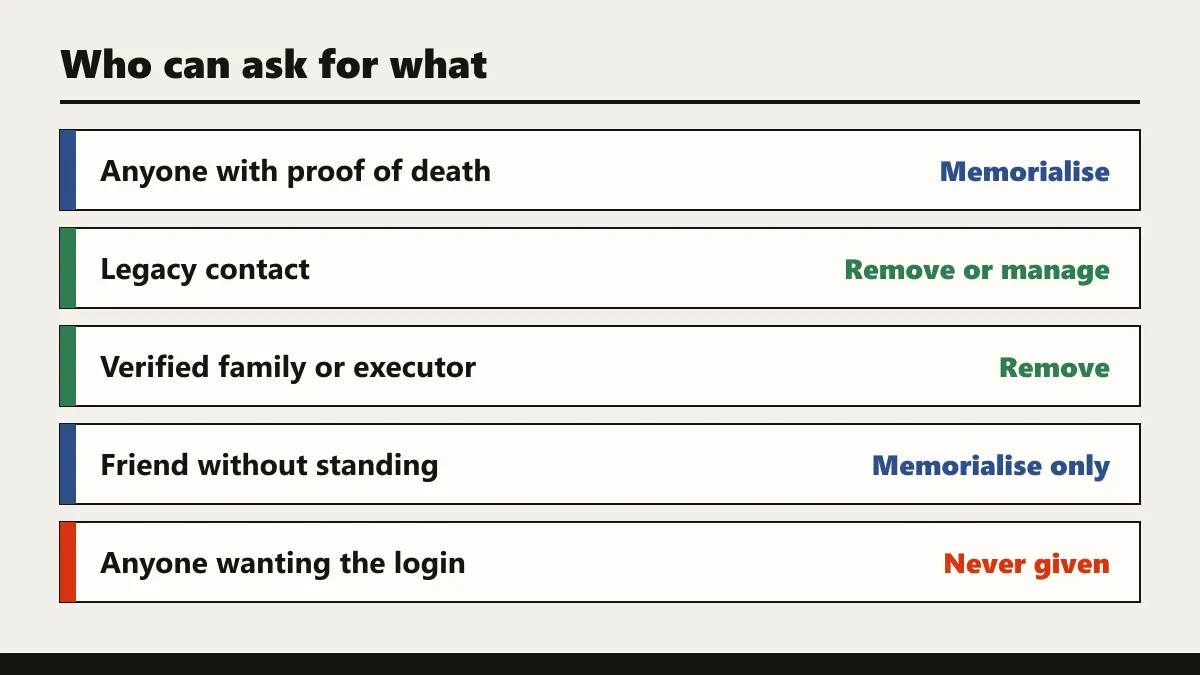
Report Facebook profile as deceased: who can ask Meta to memorialise, who can ask to remove, and what a legacy contact may do.

How to delete Facebook account for someone who died: three checks

The removal route uses the same form with a different box ticked, but Meta checks the requester far more strictly. Anyone looking up how to delete Facebook account for someone who died should start with three questions.

Did they choose "delete after death"? Some people set this while alive. Meta then deletes the account and its content once it receives proof of death, according to its help page, and no further request is needed.

Is there a legacy contact? A legacy contact is an adult the person chose to look after the memorialised profile. Per Meta's legacy contact page, that person can write a pinned tribute post, change the profile and cover photo, accept friend requests, request removal of the account, and download a copy of what was shared if that option was switched on. They cannot log in, read messages, or remove friends. If a legacy contact exists, removal is their decision, not the family's.

If neither applies, a verified immediate family member or executor can ask for removal, attaching the death certificate and proof of the relationship. Without that verification, the profile stays memorialised.

So, how do you close a Facebook account when someone dies? Memorialise it if you only want it quiet and protected; remove it if you have the standing and the documents.

Report Facebook profile as deceased, or keep it as a memorial?

Families often split on this. A memorialised profile keeps photos and messages from friends in one place and blocks anyone from logging in, which also shuts out hijackers. Removal ends the reminders for good but deletes everything, and Meta cannot restore it afterwards.

Question Memorialise Remove
Who can request Anyone with proof of death Legacy contact, or verified family or executor
Profile visible Yes, with "Remembering" No
Birthday reminders and suggestions Stop Stop
Anyone can log in No No account left
Reversible Removal can still follow No

There is also a practical reason to report a Facebook profile as deceased quickly. An unattended profile can be copied: a scammer lifts the photos, opens a lookalike account and messages friends asking for money. A memorialised account cannot be logged into, and copies stand out against it. If a fake account appears, report it to Meta as impersonation of a deceased person, an option on the same special request form, and use the general route to report facebook account abuse for any profile that keeps messaging friends.

Pages, Instagram and the accounts that don't close themselves

A Facebook account rarely stands alone. Meta's memorialisation page says a Page whose only admin has died is removed after a valid request, and the special request form has a separate "deceased Page admin" option. If the business needs to continue, a living admin should be added before the memorialisation goes through; our note on the facebook page takedown request explains how Meta treats Pages differently from profiles.

Instagram is separate. Memorialising a Facebook profile does nothing to an Instagram account, which has its own memorialisation and removal forms in the Instagram Help Centre. The same is true of other apps: each needs its own request, and when a fake copy appears you will need an instagram impersonation report or a separate route to report snapchat account misuse. On TikTok, how to report impersonation on tiktok follows similar proof rules, and dating apps, where a grindr catfish report is the route, see the same reuse of photos.

Photos and creative work are a third thread. If someone re-uploads the person's art, music or films after their death, the estate holds the copyright, not the platform. How to report stolen art on deviantart, how to report stolen content on tiktok and the vimeo copyright strike process all start from that ownership.

When the report is wrong, malicious or fake

Mistakes happen in both directions. In November 2016 a Facebook bug placed memorial banners on the profiles of many living users, Mark Zuckerberg's included, and the company called it a "terrible error" (CBS News, 2016). Individual false reports still occur, and a living person whose account was memorialised can ask for it back through Meta's "My Personal Account is Memorialized" form with photo ID.

So before anyone looks up how to report someone dead on FB, or how to report someone as dead on Facebook, as a way to lock a living person out, the answer is plain: Obscura declines it. Filing a false death report is an abuse of the process, it is quickly reversed, and it can expose the reporter to consequences beyond Facebook. The same applies to fake grief messages: some scams arrive as an instagram copyright violation whatsapp notice or a fake Meta warning, timed to reach a family in the week after a death. Memorialisation runs through Facebook's own form and email, so treat any chat message demanding a fee or a password to "process" it as a scam.

Harassment on a memorial profile is a reporting matter too. Abusive comments under a tribute post can be reported like any other comment; our page on how to report harassment on instagram sets out the categories Meta reviews across both apps, and you can report a tweet that mocks the person on X.

Where Obscura fits, and where it doesn't

Most families can file these forms themselves, and we would rather they did. Obscura helps when a case stalls: a name mismatch between the profile and the documents, an impersonation account that keeps coming back, a Page that a business still relies on, or scam ads reusing the person's photos, where the route to report a youtube advert or a report instagram account filing may also be needed.

Obscura prepares the request and the evidence; Meta makes the final decision on every memorialisation and removal. We never ask for the deceased person's password, never try to log in to their account (which Meta's terms forbid), and never promise a timeline, because Meta publishes none. Our disclaimer sets out those limits. If a request has stalled, ask Obscura for a confidential review and we will tell you which form and which documents fit before anything is filed.

Straight answers

Fill in Meta's Special Request for Medically Incapacitated or Deceased Person's Account form and choose the memorialisation option. That is how to report someone as deceased on Facebook, and it is also how to report a Facebook account as deceased when you only know the person through the site. The form asks for your name and email, the profile's name and URL, the date of death and a document proving it: a death certificate, an obituary or a memorial card. You do not need a Facebook account of your own to send it. The name on the document has to match the name on the profile, so attach an obituary that lists a nickname or married name if the two differ. Meta then memorialises the profile, adds Remembering next to the name and stops birthday reminders. It does not give anyone the password, and it does not publish how long the review takes.

You request removal on the same special request form, but only certain people can. How do you close a Facebook account when someone dies, then? First check whether the person chose delete after death in their settings; if they did, Meta deletes the account once it has proof of death. Next check for a legacy contact, because if one exists, only that contact can ask for removal. Otherwise a verified immediate family member or the executor can, with the death certificate and proof of their relationship or authority. Anyone else can only ask for memorialisation. That split is the core of how to close a Facebook account when someone dies, and it explains most rejected requests: a cousin or friend who asks for removal is refused, while the same person asking for memorialisation would have succeeded. Removal deletes posts and photos for good, so families often download keepsakes first.

Apply as immediate family or as the executor, with documents that prove both the death and your standing. For how to delete Facebook account for someone who died without a legacy contact, the special request form is the only route: choose removal, give the profile URL, upload the death certificate, and add proof of your relationship or your authority over the estate. Meta's form says documents must match the account's information, so a mismatch in names or dates is the most common reason for a delay. Cover any personal details on the certificate that Meta does not need. If you are not immediate family and hold no estate role, Meta will memorialise the profile instead of removing it. Obscura can check the document set before you file, but it cannot verify you on Meta's behalf, and it never asks for the account's password or tries to sign in to it.

No. Meta says it will not provide login information for anyone's account, and logging in as another person is against its policies, including after a death. Learning how to report someone's death on Facebook therefore does not unlock the inbox. Once memorialised, the account cannot be logged into by anyone at all. A legacy contact can pin a tribute post, change the profile and cover photo, accept friend requests and download a copy of what was shared if the person allowed it, but cannot read private messages. Meta's terms describe limited disclosure of account information to a legacy contact or to someone named in a valid will or similar document giving clear consent. If you know the password already, using it still breaks Meta's rules and can get the account locked or flagged. Messages the person sent you remain in your own inbox, which is often where the most personal material sits.

A friend can, for memorialisation. Meta accepts memorialisation requests from friends, followers or family who supply proper documents, so how to report someone died on Facebook is the same for a school friend as for a sibling. Removal is different: only the legacy contact, or verified immediate family or an executor, can ask for the account to be deleted. If you are a friend and the family has not acted, memorialising the profile is usually the kind thing to do, because it stops birthday reminders that upset other friends and blocks anyone from hijacking the login. It is worth telling the family first, since some prefer removal and a memorialised account can still be removed later by someone with standing. Keep the confirmation email Meta sends. If the profile is not memorialised within a few weeks, a second request with a clearer document, such as an obituary naming the profile's display name, usually resolves it.

The living person can reverse it, and the false reporter gains nothing. Anyone searching how to report someone dead on FB, or how to report someone as dead on Facebook, to lock out a living person should know Meta asks for proof of death, and a memorialised living user can file Meta's My Personal Account is Memorialized form with photo ID to get the account back. False memorialisation has happened at scale before: in November 2016 a Facebook bug put memorial banners on many living users' profiles, which the company called a terrible error. Deliberate false reports are an abuse of the process and can carry consequences beyond Facebook, including impersonation or fraud complaints where forged documents are involved. Obscura declines any request to report a living person as deceased, and it does not file reports meant to silence, lock out or punish someone. A genuine mistake, on the other hand, is a common and fixable problem.

We can prepare the request with you, but the filing rests on your standing and your documents. When a family asks us to report Facebook profile as deceased, Obscura checks that the profile URL is right, that the names on the documents match the account, and which option fits: memorialise, remove, deceased Page admin, or impersonation of a deceased person. We then help you submit through Meta's own special request form. Obscura prepares the request; Meta makes the decision, and it publishes no timeline, so no one can promise when a profile will change. We never ask for the deceased person's password, never attempt to log in, and never use unofficial tools or contacts inside Meta. Most families can file this themselves in under half an hour, and we say so. Where we add value is in stalled cases, such as a recurring impersonation account, a business Page that needs a new admin, or scam ads reusing the person's photos.

EW

Eleanor Whitfield

Media-law-trained content removal lead who routes each case to the fastest lawful path — platform policy, DMCA, or defamation counsel.

Related briefings

Instagram Business Verification Badge Requirements

Instagram business verification badge requirements depend on the route. A notable brand can request the free badge if its account is authentic, unique, complete, and covered by several news sources. Meta reviews every request and decides. Other businesses can subscribe to Meta Verified, which needs an eligible business profile and confirmed business details.

Report Instagram Account Impersonating a Business

Report Instagram account impersonating a business from the fake profile itself: tap the three-dot menu, choose Report, pick the impersonation reason, then select "A business or organization". Instagram's reviewers decide the outcome. A registered trademark opens a second route, Meta's Trademark Report Form, which the mark's owner or an agent acting for that owner can file.

How to Get Someone Banned on Instagram Without Bots

To get someone banned on Instagram you file the specific reports Meta actually acts on — impersonation, harassment, non-consensual intimate images, credible threats, or copyright — via the in-app menu or the dedicated form for your case. There is no fixed report count, no user-invokable IP ban, and no legitimate mass-report bot. A single well-evidenced report from a genuine victim outperforms a hundred noisy ones, and coordinated brigades often get the reporters actioned instead of the target.

Send us the link. We'll tell you honestly whether it comes down.

Every case starts with a private review: we look at the content, tell you which route can work — platform policy, DMCA, legal notice, right to be forgotten, or suppression — and give you a plain assessment before any commitment.