What are you actually reporting on WhatsApp?
Reporting in WhatsApp is not one button. It is a set of small doors, and which one you get depends on the thing in front of you: a saved contact, a number you have never seen, a group you were dropped into, or a link someone pasted. Each one sends a slightly different package to the reviewer, and each one has a cost you should know before you tap, such as losing your place in a group. People who ask how do I report someone on WhatsApp are usually asking which of those doors applies to them. WhatsApp itself is plain about the route. Its help centre says the only way to report someone is to follow the in-app reporting process, and that contacting the company any other way will not speed a review or change the outcome (WhatsApp Help Center, "About reporting and blocking", read 7 November 2026).
Obscura is a UK content-removal firm, and this briefing exists because many of the WhatsApp questions that reach our inbox are really questions about which door to open. The short version sits in the table below. The rest of the page walks through each object, then each device, then the ban questions people attach to all of it.
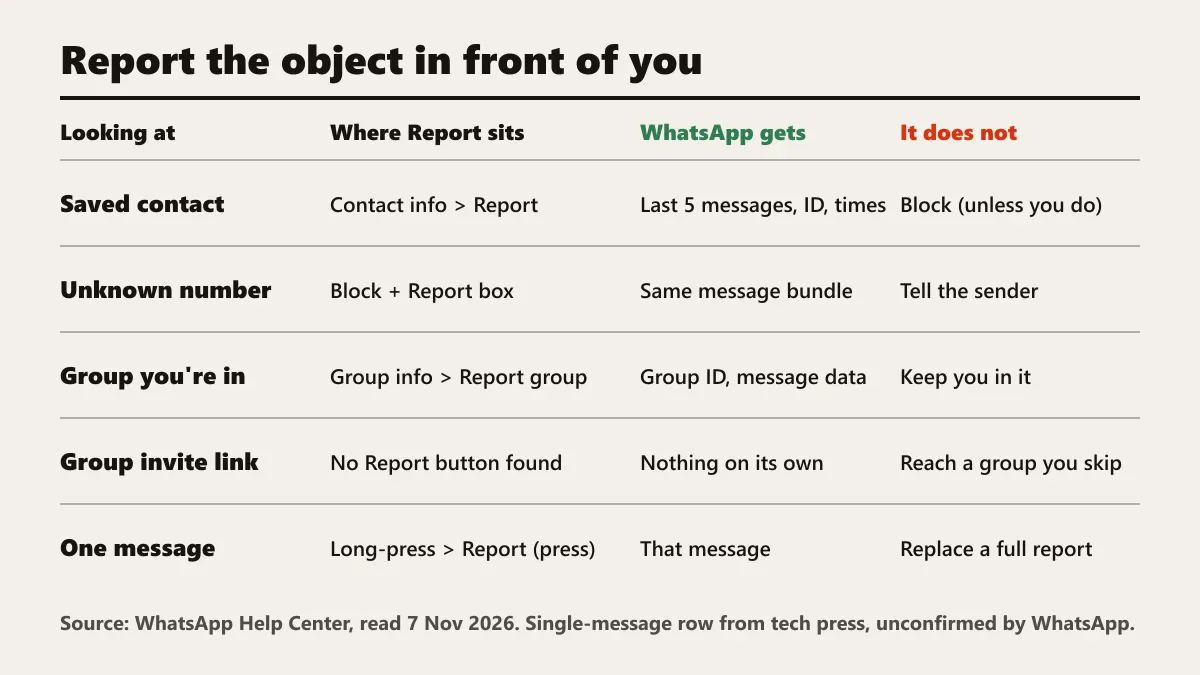
| What you are looking at | Where Report sits | What WhatsApp receives | What it does not do |
|---|---|---|---|
| A saved contact's chat | Contact info, then Report | Up to five of their last messages, user ID, message times and types | Block them, unless you also block |
| An unknown number | Chat menu, or Block with the "Report to WhatsApp" box ticked | The same message bundle | Tell the sender anything |
| A group you are in | Group info, then Report group | Group ID and recent message data | Keep you in the group |
| A group invite link | No separate Report button found in WhatsApp's help pages | Nothing on its own | Report a group you have not joined |
| A single message | Reported in tech press as long-press, then Report | That message | Replace a full contact report |
That last row carries a caveat we come back to later. WhatsApp's own help pages, as we read them on 7 November 2026, describe reporting people and groups, not individual messages.
How do you report someone on WhatsApp from a saved contact?
Open the chat. That is the whole first step, and it matters, because every reporting path on WhatsApp starts inside a conversation rather than from a search box or a web form.
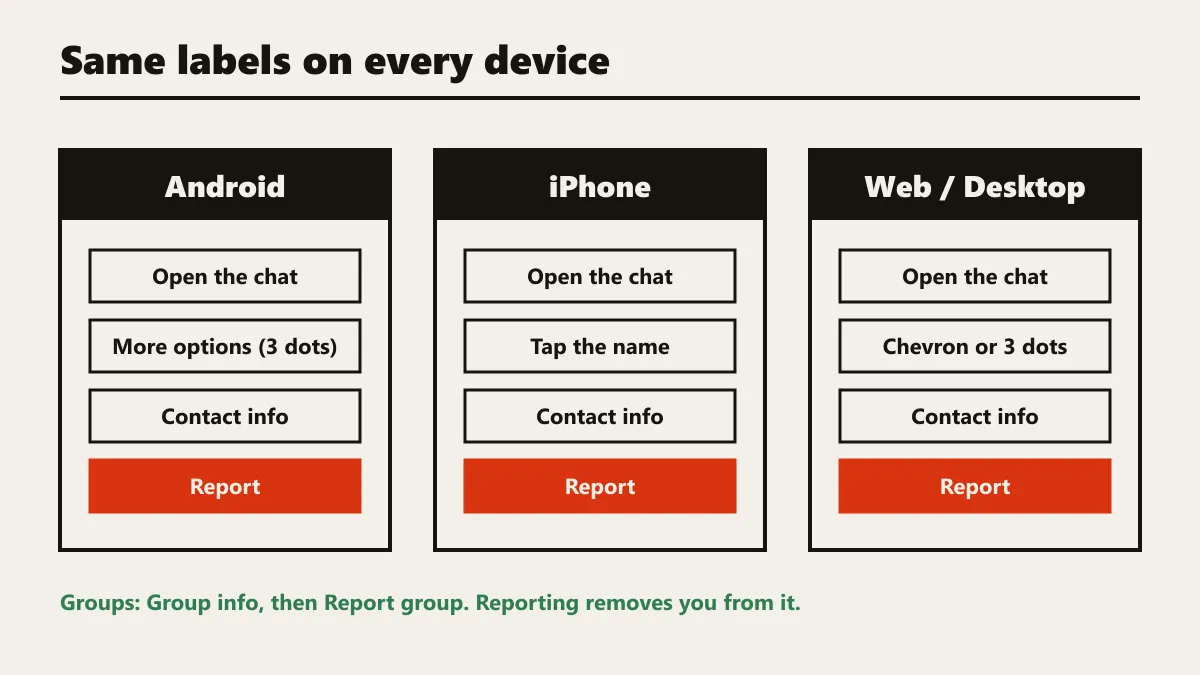
So how do you report someone on WhatsApp once the chat is open? WhatsApp's block-and-report page gives a single sequence for every platform tab: open Chats, use the three-dot More options menu at the top right (or Contact info), then choose Report followed by the contact's name (WhatsApp Help Center, "How to block and report someone", read 7 November 2026). On an Android phone people usually reach it through the menu; on an iPhone the habit is to tap the name at the top, which opens Contact info, and scroll to Report. Both land on the same confirmation. If you want the person gone from your screen as well, choose the option that blocks as it reports. Reporting alone does not block, and WhatsApp says so directly: without blocking, their messages, calls and status updates keep arriving. That is the full answer to how to report someone in WhatsApp when they are already in your contacts.
A contact report is worth more than people assume, because it carries context. WhatsApp's help centre lists what goes with it: up to five of the last messages the person sent you, the reported user's ID, information on when each message was sent and what type it was, and, where you have spoken, basic details of the last five calls. The person is not notified. WhatsApp acknowledges the report and, in its own words, will not contact you again. No reference number, no follow-up, no outcome message. If you report contact in WhatsApp expecting a reply, the silence afterwards is normal and is not a sign the report vanished. It is also why we tell people to screenshot the chat before they tap anything, since blocking and deleting can leave you with nothing to show anyone else later.
Compare that with other apps. The question of if you report someone on Telegram, will they know gets the same answer as here: no. Snapchat routes reports from the profile or the chat, which our note on how to report someone on Snapchat lays out object by object.
How to report spam on WhatsApp when the number is a stranger
Spam usually arrives from a number you never saved. Here the block screen does double duty.
Blocking an unknown number brings up a box labelled "Report to WhatsApp". The help page describes the block flow as Block, then Block again, with that box available to tick so the number is reported at the same time, and its reporting page tells you to untick it if you only want to block. Tick it. That single tap is how to report spam on WhatsApp in most cases: the messages stop, and the reviewer gets the same bundle a contact report carries, tied to the number's account ID. The sender is not told. Report without blocking is possible from the chat menu, though there is little reason to keep a spammer able to reach you. If you searched "whatsapp how to report spam" because of a fake job offer or parcel fee, the sequence is the same. Our guide on how to report Airbnb scam messages shows why a scam that moved here also belongs with the platform it started on.
Can you report one spam message rather than the whole chat?
Possibly, depending on your version. Technology sites reported in 2021 that WhatsApp was rolling out a long-press, then Report, option for single messages. We could not find that flow on WhatsApp's own help pages when we checked on 7 November 2026, so treat it as something to look for in your app, not a promise. If it is there, it suits one bad message in an otherwise normal chat. To report spam WhatsApp messages arriving in bulk from a stranger, the block-and-report route is stronger, because it sends several messages at once.
One common pattern deserves a name. Messages claiming an Instagram copyright strike, sent to your WhatsApp with a link to "appeal", are phishing; we unpicked the Instagram copyright violation WhatsApp lure in detail. Report the number, do not tap the link.
Report group in WhatsApp, or report the link that brought you there?
Groups split into two objects people often blur: the group itself, and the invite link that advertises it.
To report group in WhatsApp, you have to be inside it. WhatsApp's help page gives the path as Chats, then the three-dot More options menu, then Group info, then Report group, with a box labelled "Exit group and clear chat" you can tick before tapping Report. Whether or not you tick the box, reporting removes you: the page says that if you report a group you will be removed from it, and that an admin would have to add you again for you to return. The group is not notified that you reported it. That trade-off catches people out. If you are collecting evidence about a scam group, screenshot first, because the report ends your view of the chat. Groups do not get the five-message contact bundle in quite the same wording; WhatsApp describes receiving the group ID and information on when messages were sent and what type they were. If one member is the problem, report that member from their own chat.
Now the link. People ask how to report WhatsApp group link spam that keeps landing in their chats, often pointing to "investment" or adult groups. We looked for a dedicated Report option on an invite-link preview and did not find one described anywhere on WhatsApp's help centre as of 7 November 2026. We are not going to invent one. What does exist is the chat the link arrived in. If a stranger or a contact keeps sending invite links, report that sender; the link message sits inside the messages WhatsApp receives. Joining a group only to report it exposes your number to every member, so think hard before doing it.
Facebook handles this differently and lets you flag groups from outside in some cases, which our briefing on how to report a Facebook group covers, and Telegram has its own split, set out in how to report a Telegram account, group or channel.
Does it matter whether you report in WhatsApp on a phone, the web or a computer?
Less than people think. WhatsApp's block-and-report page shows tabs for Android, iPhone, Web, Mac and Windows, and the steps under each one read the same: Chats, the menu, then Contact info or Group info, then Report. On WhatsApp Web and the desktop apps you click the down-chevron menu on a chat or the three dots at the top of the window rather than tapping, but the labels match. So if you need to report in WhatsApp from a laptop while your phone is elsewhere, nothing is lost, and the report reaches the same queue tied to the same account. The practical difference is evidence. A desktop makes clean full-window screenshots easy to take and store away from the phone, which helps if the case later reaches the police. One caution applies everywhere: report from the device you actually use with your own number, not a borrowed one, so that the report and your later block both sit on your account and your own chat history.
How to report someone using GB WhatsApp
Do not. Or rather, leave it first. GB WhatsApp is a modified copy of the app built by a third party, and WhatsApp's help centre names it among the unofficial apps it does not support, warning that using one breaks its terms, may carry malware, and can get your own account temporarily or permanently banned (WhatsApp Help Center, "About unofficial apps", read 7 November 2026). The same page tells users to uninstall the unofficial app and install the official one, and admits chat history may not transfer.
So the honest answer to how to report someone using GB WhatsApp is: save your screenshots, move to the official app, and report from there. We cannot tell you whether a report pressed inside a modified client ever reaches WhatsApp, and nobody outside Meta can.
How to ban a WhatsApp number when only WhatsApp holds the switch
You cannot. Only WhatsApp can ban or unban an account, and its help centre adds that third-party services cannot ban an account or lift a ban (WhatsApp Help Center, "About account bans", read 7 November 2026). Every search for how to ban WhatsApp number, how to ban WhatsApp account or how to ban number on WhatsApp ends at the same two tools, which happen to be the ones this page has been describing. Block, and the number can no longer message or call you. Report, and a reviewer at WhatsApp looks at what the account sent and decides, against its terms, whether to act. WhatsApp says a report won't necessarily result in a ban, and it gives no count at which one becomes automatic. What helps is accuracy: one honest report, from the chat where it happened. WhatsApp's Terms of Service bar fraudulent or groundless reports, so organising friends to flag someone you merely dislike puts their accounts at risk, not the target's.
For the outcome side of this, what bans are for and how appeals work, our separate guide covers it. This page stays with the reporting.
Will a WhatsApp ban bot on Telegram, or a free one, file reports for you?
No. Searches for a whatsapp ban bot telegram channel, or a whatsapp ban bot free download, find sellers promising to take a number offline, and what they sell does not do what the label says. Think about where a WhatsApp report comes from. It is pressed inside a chat, on an account, and it carries messages that number sent to that account. A bot running on Telegram has no chat with your target and no messages to forward, so there is nothing for it to report from. The terms rule out the rest: automated access to WhatsApp and groundless reports both breach them, which means any service that did manage to fire reports in bulk would be risking every account it used. Behind these offers we usually see one of three things. Some take a payment and disappear. Some ask for your number or a verification code, which is how accounts get hijacked. A few claim credit for whatever WhatsApp was going to do anyway.
Obscura declines this work, and not as a sales line. We wrote up the same pattern elsewhere: the Telegram report bot storefronts selling Instagram spam reports, the TikTok spam report bot offers, and the mass report Twitter account bot pitch all fail for the same reason. Reviewers weigh what a report contains, not how many arrive.
Where Obscura fits once you have reported, and where it does not
Obscura cannot file a WhatsApp report for you, cannot push a review up a queue, and cannot ban a number. Those limits are WhatsApp's design, not modesty. What we do is the work around a report, the part that sits on platforms with public pages and takedown routes. A WhatsApp scam often has a second life: a fake profile using your name, a storefront, a post with your photos. Those can be removed through policy, copyright or legal routes, which is the job we take on. Readers dealing with a cloned profile elsewhere may find our Instagram fake account report guide useful, and one using your name on TikTok has a separate path in how to report a scammer on TikTok. Someone selling your work after contacting buyers on WhatsApp is a copyright matter; see how to report stolen art on DeviantArt and Redbubble.
If threats came with the spam, Instagram's harassment routes may matter too, explained in how to report harassment on Instagram, and it is worth knowing what reporting someone on Instagram does before you rely on it.
A word on limits. Some content can be removed; other material, such as truthful reporting, genuine public records or protected opinion, can at best be pushed down in search, never taken down, and we say which applies before any fee. We never forge notices and never ask for your passwords or verification codes. Our disclaimer sets out what we can and cannot promise. If a WhatsApp problem has spilled onto the open web, tell us what is showing up and our team will reply after a confidential review.