The undo button people look for is not in Instagram's documentation
The undo button people look for does not appear in anything Instagram publishes on reporting. As of November 2026, the Help Centre articles on reporting a post, reporting a comment and viewing what you have reported explain how to file a report, how to read the decision and how to ask for a second look, and none of them mentions cancelling, deleting or withdrawing an ordinary report once it has gone. So the honest answer to how to un report a post on Instagram is that you can't, at least for anything sent through the in-app Report button. The same answer covers how to undo a report on Instagram whatever object you pressed it on. What remains is narrower and more useful: reverse whatever you accepted alongside the report, check the outcome, and, for one class of report filed on a rights form, use a real retraction route.
How to un report a post on Instagram: two fixes that do nothing
Search results for how to un-report a post on Instagram also hand out two fixes worth ignoring. The first tells you to reopen the post and tap Unhide. Where that control exists, it changes your own view and tells the reviewer nothing. The second tells you to write to a support address and ask for the report to be dropped; we found no Instagram page promising that anyone would act on such a message for an ordinary report.
No cancel path, then. We won't draw one.
I accidentally reported a post on Instagram: what now?
Look at the screen before tapping again. The published steps stop at "follow the on-screen instructions", and the message version of the flow ends with a Submit report button, so a reason screen still open may not have been sent yet. Back out if you can; we can't vouch for where the point of no return sits on every surface and app version.
If it has gone, leave it. Nobody needs a second report to explain the first, and reporting again in the hope of cancelling only adds another entry. The five report buttons compared side by side will tell you which object your tap attached to, which matters for the table below.
This regret isn't special to Instagram either. TikTok has its own version of the question, covered in what to do if you reported a TikTok video by mistake, and on X the phrase often turns up inside a scam message, which is why a "you accidentally reported" DM on Twitter deserves suspicion before any reply.
What can you reverse after an accidental report?
Separate the report from everything around it. The report itself is a message to a review queue. The block, the mute and the restriction you may have accepted a moment later are settings on your own account, and those you control. Instagram's comment article, for one, says you can also restrict or block the person after reporting, and its Support requests page suggests the same tools when a report finds no violation.
| What you pressed | Take the report back? | What you can reverse | Where |
|---|---|---|---|
| Post or reel | No documented route | Only side actions you accepted | See the block, mute and restrict rows |
| Story | No documented route | Only side actions you accepted | The story expiring says nothing about the review |
| Comment | No documented route | Side actions; no documented way to unhide it for yourself | Comment stays hidden from you even if Instagram keeps it up |
| Account | No documented route | Only side actions you accepted | Check your blocked list first |
| Block offered in the flow | Not a report | Yes | Profile, Menu, under Who can see your content tap Blocked, then Unblock |
| Restrict offered in the flow | Not a report | Yes | Profile, Menu, under How others can interact with you tap Restricted, then Unrestrict |
| Mute | Not a report | Yes | Their profile, Following, Mute, switch Posts or Stories off |
| Copyright or trademark form | Yes, officially | The report itself | Retraction form in the report email, or the Help Centre contact form |
Those paths come from Instagram's pages on seeing and unblocking blocked accounts, restricting and muting. Menu labels move between app versions, so trust the label over the position. After unblocking, check whether any follow between you survived; we would not assume it did.
How to un-report a story on Instagram
You can't, and the clock does not help. A story report is filed from the icon at the top of the photo or video, and the story article describes no withdrawal. The story vanishing on its normal schedule doesn't tell you the report was dropped or decided.
How to un report someone on Instagram
Can you un-report someone on Instagram from their profile instead? The same answer applies. People type un report instagram account, or simply how to un report on Instagram, hoping an account-level report behaves differently, and nothing published suggests it does. Reporting an account does differ in what the reviewer looks at, depending on the account type and route. Taking it back doesn't.
I accidentally reported a comment on Instagram
Here your own view changes straight away. Instagram says that after you report a comment you will no longer see it, and adds that this doesn't mean it was removed. So an accidentally reported Instagram comment that has disappeared from your screen may be perfectly visible to everyone else. Ask a friend, or check from a logged-out browser if the post is public, before you assume the worst.
The one real retraction: copyright and trademark forms
There is exactly one official reversal, and it covers rights reports only. Instagram's article on retracting an intellectual property report says a reporter who filed by mistake, or who reached an agreement with the person who posted, can withdraw it. The preferred method is the retraction form in the email Instagram sent about your report; the alternative is the contact form linked from that article. Once Instagram receives the withdrawal, it restores the content if it has already come down and confirms by email, though technical limits or a removal for some other reason can stop restoration. Keep that email. It is the difference between a rights report and every other kind, and the difference has a reason: those filings are signed legal-style claims made in your name, which is why the anonymous forms and the named forms behave so differently. Tapping Report under a post and choosing a reason is not that filing, and this route doesn't stretch to it.
What happens when you accidentally report someone on Instagram
Your report joins the same process as a deliberate one, and very little of that process turns on your intent. A reviewer or an automated system compares the content with the Community Guidelines. It does not weigh how sure you were, and Instagram's own page on how it decides what to remove states that the number of times something is reported doesn't determine whether it comes down. That is the reassuring part of what happens when you accidentally report someone on Instagram: a post that keeps to the rules has no violation for a report to find, so one mistaken tap should end with the post staying up and the owner's account untouched. "Should" is deliberate, because moderation makes errors in both directions. It is also why Instagram counts strikes rather than reports: penalties follow confirmed violations, and the report is only what brings the content to a reviewer's attention. Your mistake supplies a look. It doesn't supply a verdict.
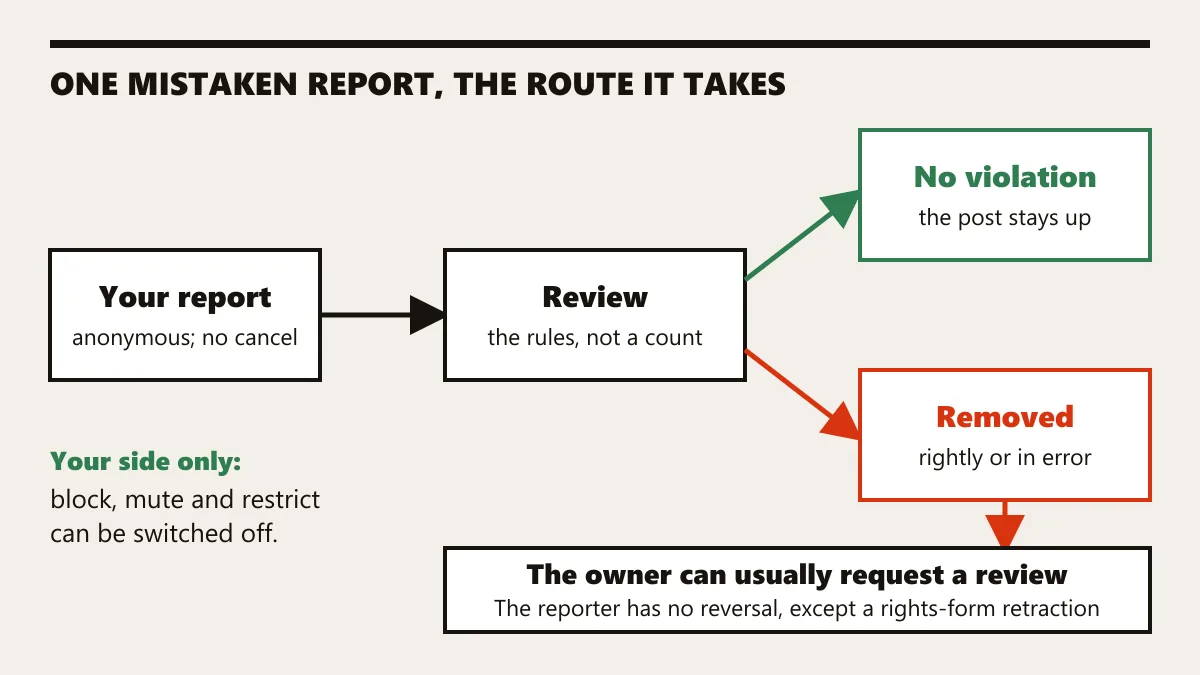
Will they find out? Not that it was you, in the ordinary case. The Help Centre says your report is anonymous except for intellectual property reports, and that the reported account won't see who reported them. Copyright removal notices may carry the rights owner's name and email, which is the exception worth remembering.
They might still learn that somebody flagged something. Instagram can send a notice that a post or comment may have been hurtful, showing the flagged content and offering to delete or keep it, even when that content breaks no rule; the same page says the notice doesn't affect their account. If you know them and it bothers you, telling them you hit the wrong button is an option, though it gives up your anonymity for good.
Could the slip count against you? We found no Instagram page describing a penalty for one honest mistake. Meta's rules do target people who misuse its reporting systems to harass, intimidate or silence others, and that describes campaigns rather than a stray thumb. If somebody is telling you they "accidentally mass reported" you, that is a different conversation, and the section on report waves and sellers deals with it.
One more possibility: the report may have been right. If you pressed it in a hurry but the post really is abuse aimed at someone, leave it alone and read the four lanes for harassment reports before deciding you made a mistake.
If a mistaken or malicious report has already cost you a post or an account, ask for a confidential case review. We will tell you which route applies before anything is charged, and whether any route applies at all.
Reports on Instagram: where to see them, and what the list leaves out
Reports on Instagram live in Support requests, not in your activity log. As of November 2026 the iPhone version of the Help Centre article gives this path, and it answers how to check report on Instagram:
- Tap your profile picture in the bottom right.
- Tap Menu in the top right.
- Below More info and support, tap Help.
- Tap Reports and violations, then Reports.
- Tap the report you want to open.
The same article's default version names the older sequence: More, Settings, Help, Support requests, Reports. You may see either, so follow whichever labels your app shows.
That list is also the honest answer to how to see reported posts on Instagram, and it has a limit printed on the page: "Every report that you've made may not be viewable in Support requests." So a missing entry proves nothing, neither that your report was dropped nor that it never went through. Where a report does appear, you can read when Instagram acted and what it decided, follow policy links, and sometimes request a review of the decision, although some content types don't allow one yet. Notice what isn't on that list of actions. There is no delete, cancel or withdraw option described, which is the closest thing to a direct answer on how to undo report on Instagram that the company gives. Treat the screen as a read-only record of your side of the case, and don't expect it to name who else complained or how many people did, because the page promises neither of those things to anyone.
Is "Instagram reports" the same thing as Support requests?
Not always. People searching instagram reports mean at least three different things: this reporter's list, the analytics summaries a creator exports, and the transparency figures Meta publishes. This page covers the first only. Snapchat, for comparison, has its own My Reports tracker, and the same caution about reading absence as an answer applies there.
If the post came down anyway: the owner's review, and where we stop
A removal that follows your mistaken report isn't yours to reverse. The remedy sits with the account owner. If you know them, tell them it can be challenged: Instagram's page on content it should not have taken down says the owner can usually request a review from the notification, Account Status or the Support Inbox, that an answer can take up to 90 days (Instagram Help Centre, checked November 2026), and that content found to have been wrongly removed is reposted. Some decisions may then go to the Oversight Board, which takes only a limited number of cases. For copyright removals the owner has a separate appeal or, under the DMCA procedure, a counter-notification, and a person who filed that report by mistake can shorten the whole thing by retracting it. Nobody needs a third party for any of these steps, and no form of words from you, the reporter, replaces the owner's own request on an ordinary report.
Beware of anyone offering to do it for you. A message claiming to be from Instagram about your report, or about a copyright strike, should be checked first, and the WhatsApp copyright warning shows how those approaches are dressed up. Never hand your password to anyone in order to fix a report, us included.
A report attaches to one object on other platforms too, which is why the worry travels: a tweet report sticks to one post ID, and reporting a YouTube ad on a PC has its own steps against that one ad. Signed rights notices sit in a different class on every site, as the stolen-art route on DeviantArt and Redbubble shows, and so does the money side of a fraud, where a scam report can return very different things.
What we do, and what we won't
Obscura doesn't take reports aimed at rule-abiding people, false reports, bots or report volume, and report volume doesn't decide outcomes anyway. The platform makes the final decision in every case we file. Truthful reporting, genuine public records and protected opinion can't be removed through any of this; suppression is the only lawful tool there, and forging a notice against them invites a worse problem than the one you started with. No guarantees, and no requests for your password. The limits are set out in our disclaimer.
One case overrides everything above. If what you reported was sexual material involving a child, don't try to reverse anything: send it to NCMEC's CyberTipline or the Internet Watch Foundation, or to the police where a child is in danger.